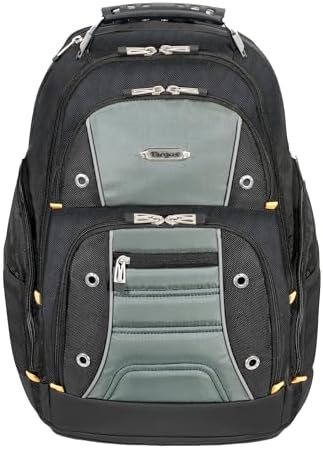
The Targus Drifter II makes the most sense when your laptop bag needs to act like a mobile work locker. The space and pocket layout are designed for a laptop, chargers, cables, documents, and small tech.
The catch is that size does not settle the purchase. Before keeping it, check four things: your laptop chassis, the packed zipper path, the loaded strap comfort, and the current unit’s stress points.
Scorecard
The Targus Drifter II’s 85.34 DVSS Score and Excellent tier put it in a strong scorecard position for large organized laptop carry, but they do not prove whether a thick 17.3-inch laptop clears the zipper, whether strap stitching holds under a packed kit, or whether the current unit avoids the zipper, seam, handle, and material failures tied to the 9.17% serious-downside share.
| Metric | Result |
|---|---|
| DVSS Score | 85.34 |
| Satisfaction Tier | Excellent |
| Dissatisfaction Score | 10.62% |
| Critical Dissatisfaction Rate | 9.17% |
Based on buyer feedback patterns, not hands-on testing. See how this scoring works.
That 9.17% serious-downside share traces to strap stitching, shoulder-strap seams, zipper tracks, zippers unzipping under load, handle cracking, handle attachment risk, seams, and material issues — so the fit, pocket, comfort, and weak-spot sections below matter before the final verdict.
Quick Take
- Best For: Large work or travel tech kits with a laptop, chargers, documents, and small electronics.
- Not For: Thin daily carry, smaller frames, guaranteed thick 17.3-inch laptop fit, locked security, or camera protection.
- Top Strength: A pocket map that separates chargers, power bricks, cables, tablets, drives, flash drives, card readers, and travel valuables.
- Main Limitation: Fit, zipper, strap, structure, and current-unit stress checks matter before keeping it.
The 34L Size Only Helps If Your Kit Earns It
A large laptop backpack can solve scattered tech carry, or it can become extra bulky before the first zipper closes. The Drifter II sits on that line.
When the space finally makes sense
The Targus Drifter II earns its keep when the 34L space is filled by a real work kit — laptop, books, chargers, documents, and accessories — but that same large-over-28L footprint can feel like too much bag before the load is even finished.
Treat 34L as a size class, not a packing promise. Clothes, shoes, toiletries, and an umbrella can be added to the trip load, but the fuller the main compartment gets, the more the zipper, carry weight, and under-seat fit need checking.
Where the size starts pushing back
If your normal carry is a slim laptop, charger, and a few documents, the size advantage turns into a bulk check. The large body can feel heavy or oversized before it solves a real packing problem.
Size only gets you to the fit question. The next issue is whether the laptop clears the compartment once the bag is packed.
Screen Size Is the Wrong Fit Shortcut
The Drifter II’s laptop story looks simple until the 16-inch, 17-inch, and 17.3-inch details get separated. The check is not the screen label; it is the chassis inside a packed bag.
The 15.5-by-11.5-by-2-inch clue
The Targus Drifter II can look like the safe answer for a 17-inch or 17.3-inch laptop, but the fit decision really comes down to the chassis: one sleeve measures 15.5 inches tall, 11.5 inches wide, and 2 inches thick, and thick gaming or workstation laptops can still keep the zipper from closing cleanly.
Measure your laptop’s width, depth, and thickness, then test the zipper closure after packing the normal kit. Skipping that check can leave you with a laptop that technically fits in the compartment but prevents the bag from closing around chargers and documents.
Too tight and too loose can both happen
Keep the 16-inch and 17-inch versions separate. A bulky 14-inch Alienware cue belongs to the 16-inch version, while the 17.3-inch question belongs to the larger-fit lane and needs its own width, depth, and thickness checks.
Both failures are possible: a thick laptop may press the zipper, while a 14.5-inch laptop or smaller machine can slide into the larger compartment unless a sleeve fills the gap.
Two-laptop carry belongs in the verify-first category. A 17-inch laptop and a 15-inch laptop may fit together only when the thickness, chargers, and zipper closure all cooperate.
Check the laptop corners and the bottom edge before relying on the padding. If those areas matter, add a sleeve — a large compartment can separate the laptop without fully controlling corner movement or bottom-edge exposure.
Check the exact listing before treating fit details as universal. TSB239US, TSB23901, TSB238US, black/perforated, and black/gray references sit beside the 16-inch and 17-inch split, so the safe check is the current variant plus the actual laptop chassis.
The Pockets Matter More Than the Empty Space
The strongest reason to consider this backpack is not just that it is big. What separates it is how many small work and tech items it can hold before the bag becomes messy.
The soft-lined pocket earns a job
The Targus Drifter II’s strongest argument comes from its pocket map, not just its volume: upper pockets, a front organizer, a hidden/lumbar pocket, and a soft-lined top pocket split chargers, power bricks, cables, iPad, hard drives, flash drives, and card readers before everything becomes one loose tech pile.
Use the soft-lined top pocket for scratch-prone small tech such as hard drives, flash drives, and card readers, but use a hard case when impact protection matters. Soft lining helps against surface contact; it does not replace a hard shell if the drive takes a hit.
Beyond chargers and cables, the spread of smaller items is wider than it first appears. Mouse, keyboard, Ti-89 calculator, Kindle, and Nook items can be added to the kit, but that only helps if the pocket map matches how often you need each item during the day.
Many zips can slow the grab
The many-zip layout helps separation, but it can slow retrieval when cables, keys, and small accessories are spread across too many openings. Pack the normal kit once and check whether the layout matches your grab habits — a pocket you cannot find quickly becomes storage you stop using.
The lower-back pocket can keep a passport, wallet, cash, currency, or a first-aid kit away from exposed front storage, but it should not be treated as locked security. If theft resistance matters, check the closure and locking requirements before buying, because hidden placement alone does not prevent access.
Water and bottle storage need limits
Rain use and a water-resistant bottom belong in the short-exposure lane, not the waterproof lane. If electronics ride inside, check the zipper and seam areas or add rain protection before relying on the bag in heavier weather.
Side pockets can handle some bottles — a 16 oz drink, a large water bottle, a 50 oz Smartwater bottle, and a 1-liter bottle have all been mentioned as fits — but mesh-pocket weakness and a full main compartment can change whether those pockets remain easy to use. Test side-pocket access with the actual bottle after the main compartment is packed.
The Weak Spots Are Specific Enough to Test Early
The Drifter II should not be judged by rugged looks alone. The stress points are specific, which makes the return-window check specific too.
Zippers need a packed-load check
Load the bag, zip the main compartments, lift from the handle, and inspect strap stitching, shoulder-strap seams, zipper tracks, handle attachment, seams, and fabric panels before the return window closes. These are not vague cautions — each is a physical point worth checking.
Zip every loaded compartment repeatedly and inspect the zipper tracks before keeping the bag. A zipper that creeps open or separates only after the bag is full will pass an empty-bag check.
The handle and strap seams do the heavy lifting
Nearly 70 lbs and about 40 pounds are stress anecdotes, not load ratings. Use your real packed kit to check straps, handle, zippers, and seam pull, rather than treating those numbers as a safe carrying target.
Lift the packed bag by the handle and inspect the handle cover and attachment points during the return window. A handle that feels fine empty can pull differently once the laptop, books, chargers, and travel items are inside.
Older praise does not settle the current unit
Long-use history includes 3 years, 5–6 years, 7 years, 15 years, and 17 years, but early failures after a few weeks or 37 days keep the current-unit check from becoming optional.
Older praise and newer workmanship concerns belong together, because the current unit matters more than the product’s best historical version. Inspect seams, zippers, straps, handle points, and fabric panels early — those are the parts that decide whether the bag is worth keeping.
Padding Is Not the Whole Comfort Answer
A padded backpack can still feel wrong once the load and body shape enter the decision. Comfort here depends on how the large body sits after it is packed.
A smaller frame changes the straps
The Targus Drifter II has padded shoulder straps and back padding, but comfort depends on the loaded shape: the bag can fold or feel large, the larger context lacks compression straps, and a 5’3″ frame cue shows why shoulder-only carry needs a try-on before keeping it.
No chest strap and no waist strap mean the shoulder straps carry more of the decision. Try the packed bag on the intended frame before keeping it, because padding does not fix a bag that feels too wide or a load that pulls away from your back.
Heavy carry changes the answer
The larger version can make sense for trips or big moves, but it can become the wrong daily college bag when the load is lighter, and the body still has to manage the full-size frame.
Nearly 70 lbs and about 40 lbs are part of the stress context. When your kit gets heavy, the comfort check has to include strap pull, seam movement, and how the back panel sits after walking.
Travel Use Depends on How Full It Gets
The same space that helps on a work trip can work against the bag under a seat. Travel use here is a packing decision, not a luggage promise.
Under-seat fit starts after packing
The Targus Drifter II can work as a travel tech carry when laptop gear, clothes, shoes, toiletries, and an umbrella need one bag, but carry-on or personal-item use depends on packed size, not the empty backpack.
Pack the bag first, then check the airline’s current rules — fullness is the condition that changes the answer. The large compartment can take overnight items, but the lack of clothing straps means clothes and shoes need packing discipline rather than suitcase-style hold-down.
Hidden is not the same as locked
The lower-back pocket can separate a passport, wallet, cash, currency, or a first-aid kit from front storage, but check the lock needs before buying because hidden placement is not locked security.
The Drifter II can work in professional settings when utility matters more than polish, but its rugged style is not the cleanest match for a sleek office bag. Compare a cleaner work bag if the office look matters as much as the carry capacity.
Who Should Think Twice
The Drifter II is easiest to like when your kit is large, and your laptop checks out. The wrong match usually appears only after loading.
A smaller laptop can get lost
Justify the Drifter II when the kit is genuinely large; think twice if a 14.5-inch laptop can slide in the larger compartment, a 5’3″ frame puts the straps too wide, or the 34L body solves less than it adds.
When your kit is light, the cleaner comparison is a small or medium laptop backpack. The Drifter II’s advantage depends on filling the space, not merely owning it.
Structure matters more than pocket count
Stand-up shape, compression, and load control matter more to some buyers than pocket count — and the larger context has no compression straps, so the body can fold or fall over when the internal load does not support it.
If the Drifter II’s pocket layout appeals but the body feels too large, too soft, or too strap-dependent, consider smaller or more structured laptop backpacks rather than assuming a similar pocket layout offers the same carry experience. SwissGear Synergy, Rosewill RBG-1701BP, and Wenger Pegasus belong in that comparison only as ways to think about size, structure, and load control — not as a shortcut for ranking.
Oakley Kitchen Sink, Targus XL, Targus CityGear, Targus Matrix, and Targus Demolition can help frame what else you might compare, but those names do not prove one option is better than another.
Camera gear needs its own protection
Camera or SLR gear can ride inside only as a carry workaround. Use a camera insert or camera bag when padding, dividers, or lens protection are the reason you are shopping.
The same rule applies to small electronics that need impact protection. The Drifter II can organize them; it does not turn every pocket into a protective case.
Buy or Skip the Targus Drifter II?
Buy the Targus Drifter II if you need a 34L-style organizer for laptop gear, chargers, documents, and small tech, and skip or compare if your decision depends on guaranteed 17.3-inch fit, compact daily carry, locked security, camera protection, or stress-free heavy-load durability.
The strongest buy condition is straightforward: your normal kit fills the backpack with a laptop, chargers, cables, documents, and small electronics, and the packed zipper, strap seams, and laptop compartment all pass inspection during the return window.
The clearest skip condition is equally direct: if laptop fit depends only on screen size, the frame feels too wide, or the bag is more bulky than your kit needs, compare smaller or more structured laptop backpacks before committing.
Check the product only after those fit and load checks make sense. Otherwise, the next step should be the category that solves the specific mismatch.
Check the Price
See More Options
