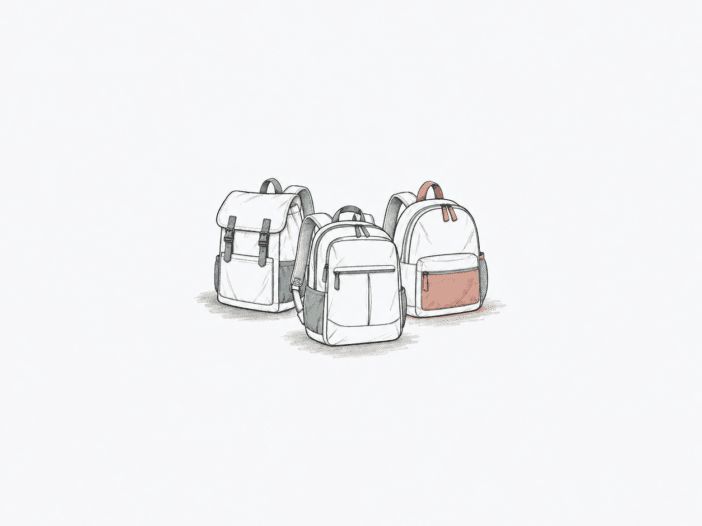
A 20–29.9L medium-size laptop backpack gives you enough space for a computer, daily essentials, and some clothing, but stays compact enough to avoid the bulk of a full travel pack. Two bags with similar liter ratings can reach their structural limits at different points once you add a rigid laptop, binders, shoes, or a full day’s load.
Your best choice comes down to where your load hits a physical boundary first. Begin with your laptop’s exact geometry, then consider the bulk of your daily items, how the harness supports that weight, and whether you need the bag to fit under a seat. These four benchmarks separate these seven packs more reliably than the stated capacity.
Best Medium-Size Laptop Backpacks at a Glance
| If your priority is… | Start with… |
| Compact everyday work and campus carry | Carhartt Classic Laptop Backpack 25L |
| Moderate school loads with a laptop | JanSport SuperBreak Plus 26L |
| Structured work-and-travel carry | Nomatic Travel Pack 20L |
| Expandable travel and under-seat use | Osprey Daylite Expandable Travel Pack 26L |
| Compact carry with theft-deterrent hardware | Pacsafe Vibe 25L |
| Mixed daily gear and larger laptops | The North Face Borealis 28L |
| Travel carry with exact laptop fit | tomtoc Navigator-T66 28L |
Carhartt Classic Laptop Backpack 25L: Best for Compact Everyday Work and Campus Carry
The Carhartt 25L holds a compact everyday load: a laptop, notebooks, work clothes, lunch, tools, or a large textbook can all fit with room left. Several wide binders, though, quickly use up the available width. This structure makes it better for daily work or campus use than as a substitute for one-bag travel.
Laptop fit is most reliable for smaller devices. A 13-inch MacBook Air fits cleanly, and 15-inch laptops also fit. Larger 16-inch laptops depend on case thickness and external geometry. Carry comfort changes with load: moderate daily loads work, but heavy books, stiff materials, thin padding, or limited strap range can concentrate pressure.
- Best match: compact daily work or campus gear rather than binder-heavy or one-bag travel loads.
- Watch the boundary: wide rigid items and heavier loads expose space and harness limits sooner than the nominal 25L number suggests.
- Choice changes when: laptop-and-case dimensions approach the sleeve boundary or a heavier load leaves too little comfortable strap range.
Need the deeper fit limits? Read the full Carhartt Classic Laptop Backpack fit and carry breakdown.

JanSport SuperBreak Plus 26L: Best for Moderate School Loads
The SuperBreak Plus fits a moderate school load: multiple 1-inch binders, notebooks, a pencil case, and a computer all fit in the open 26L body. Bulky stacks of binders and books can still hit the space limit even when the bag is technically loadable. If your school day centers on rigid paper goods, that physical boundary matters more than the nominal capacity.
The regular JanSport SuperBreak does not include a laptop sleeve, but the SuperBreak Plus does. In the SuperBreak Plus, a 15-inch laptop fits securely. A larger computer combined with books can crowd the available space. Comfort depends on both body and load: a full everyday load can work, but even a load under 5 lb can create fast shoulder and back discomfort.
- Best match: moderate school loads that need a dedicated laptop sleeve without moving into a larger backpack.
- Watch the boundary: dense binder-and-book combinations can feel cramped before the 26L figure sounds restrictive.
- Choice changes when: the real school stack crowds the laptop area or the loaded harness creates fast shoulder and back pressure.
For the school-load details, continue to the full JanSport SuperBreak Plus load and laptop-fit guide.

Nomatic Travel Pack 20L: Best for Structured Work-and-Travel Carry
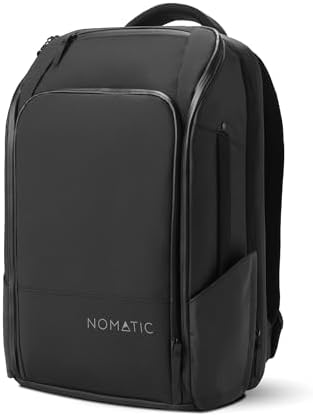
The Nomatic is a structured 20L pack, and that structure sets both its physical limits and its advantages. The 20L configuration expands to 30L, but starts from a heavy, rigid platform. On United, a packing-pouch load plus an extra pair of clothes exceeded the available travel space. Long airport use can stay comfortable, but hard strap edges and the starting weight become more noticeable as load and duration increase.
Laptop geometry matters more than screen size here. A 14-inch Razer Blade fits the laptop area, but a 2-inch-deep Tech Case exceeds the Travel Pack 20L sleeve’s 1.5-inch depth and must go in the main compartment. A device can meet the diagonal size but still fail the usable depth. Under-seat fit is conditional because the structured body leaves less compression margin as packed depth increases.
- Best match: buyers who want a structured work-and-travel layout and are willing to verify device depth precisely.
- Watch the boundary: rigid thickness and packed depth can matter sooner than nominal volume, especially around the laptop area and under a seat.
- Choice changes when: the cased device exceeds sleeve depth or the packed bag grows toward tight under-seat clearance.
Osprey Daylite Expandable Travel Pack 26L: Best for Expandable 26L Travel and Under-Seat Use
The Osprey starts at 26L and expands by 6L, covering a medium-size load with occasional overflow. The base clamshell packs large items efficiently, but the built-in organization is shallow. Filling the main compartment can press into the front pocket. Expansion relieves volume pressure but increases bulk in tight transit spaces.
A Nintendo Switch fits as part of a dense load with a 16-inch laptop, iPad Pro, Kindle, keyboard, clothing, bottle, pouches, snacks, and liquids, and that load stays within comfort limits. Under-seat fit is not absolute. On American Airlines, the packed bag fits with room for one foot beside it. On United Airlines, it fits with no extra room because the firm back panel does not compress. Under-seat clearance ranges from a clean fit to incomplete insertion as aircraft geometry and packing state change.
- Best match: travel where a 26L base is enough most of the time but occasional overflow space is valuable.
- Watch the boundary: expansion and a firm back panel reduce the compression margin that helps in tight under-seat spaces.
- Choice changes when the packed profile approaches tight under-seat clearance; the firm back panel leaves less compression margin.

Pacsafe Vibe 25L: Best for Compact Secure Laptop Carry
The Pacsafe fits best when your device setup is compact, and you need theft-deterrent hardware. Lockable access, eXomesh reinforcement, wire-reinforced straps, and zipper-security features add barriers against opportunistic access, but they can slow entry and don’t eliminate every vulnerable area. Fit remains the primary boundary: security features do not help if the harness or laptop interface doesn’t match your needs.
The dedicated laptop sleeve fits 13-inch devices. A 13-inch Dell Inspiron 2-in-1 fits the sleeve, while a 16-inch MacBook Pro fits in the bag but not in the sleeve. Torso fit is another boundary: the reinforced straps can run out of shortening range on shorter bodies, even though heavier loads remain comfortable when the harness geometry matches your frame.
- Best match: compact laptop carry where the reinforced access system is useful, and the harness fits your torso.
- Watch the boundary: whole-bag device fit is not the same as dedicated-sleeve fit, and shorter bodies can reach the strap-adjustment limit.
- Choice changes when: the laptop only fits the general interior or the reinforced harness cannot shorten enough for your torso.

The North Face Borealis 28L: Best for Mixed Daily Carry With 14–16-Inch Laptops
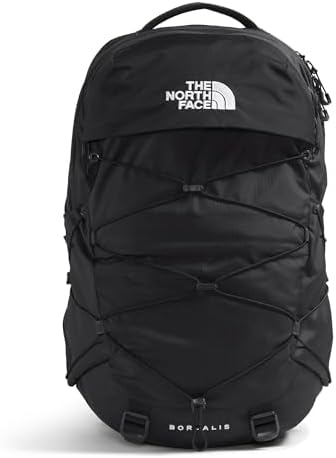
The Borealis works best when your load combines a laptop with everyday gear, not wide, rigid school items. A 16-inch MacBook Pro, full-size Bible, precision screwdriver, adapters, cables, water bottle, and glasses all fit with room left. Rigid school loads can quickly fill the available width, so the 28L rating doesn’t guarantee space for unlimited binders or textbooks.
Laptop compatibility covers the medium-pack range, but exact chassis dimensions still matter. A 14-inch MacBook fits with ample room, and 15-inch MacBooks also fit. Thicker or cased devices reduce that margin. Body geometry is another boundary: the North Face Women’s Borealis uses different harness geometry after the standard pack proved oversized for a petite frame.
- Best match: mixed daily carry with a laptop where you value more room than a compact 25–26L school pack without stepping into a travel-size backpack.
- Watch the boundary: stiff device zones and wide rigid school loads can quickly eat up usable space, and petite frames may prefer the women-specific harness geometry.
- Choose this option when: rigid items take up usable width or the standard harness is oversized for your frame.
tomtoc Navigator-T66 28L: Best for 28L Travel With Exact Laptop Fit
The tomtoc seat is the 28L configuration, not the larger 40L T66. This distinction matters because the two sizes do not share all fit boundaries. The 28L version is specified for up to a 16-inch laptop plus a 13-inch iPad, but exact chassis dimensions matter more than the diagonal. A 16-inch Surface fits the dedicated sleeve, while a ThinkPad P17 does not. If your laptop is near the stated size limit, chassis thickness decides.
Body size sets the same configuration boundary. The tomtoc Liteway 28L replaced a 40L T66 after the 40L proved too large for a 5-foot-1-inch frame. For carry comfort, 15–20 lb airport or transit loads remain comfortable, but without a hip belt, the comfort margin narrows as weight and walking duration increase.
- Best match: buyers who want a 28L travel format and are prepared to match both the exact bag configuration and exact laptop chassis.
- Watch the boundary: 28L and 40L T66 results aren’t interchangeable, and larger workstation-class laptops can exceed the sleeve limit.
- Choose a different bag when the bag is a different T66 size, the laptop chassis crosses the sleeve limit, or heavier walking makes no-hip-belt carry uncomfortable.
For exact-device shoppers, the full tomtoc Navigator-T66 guide goes deeper into configuration, laptop clearance, and travel comfort.

How to Choose a 20–29.9L Laptop Backpack: 6 Fit Checks Before Buying
- Check the current airline rule. Before flying, check the ticketed carrier’s permitted dimensions and test all three axes after packing.
- Confirm the exact size variant. Match the listed capacity and model configuration to the version whose fit you are evaluating.
- Measure the exact laptop and case. Compare full chassis dimensions with the dedicated sleeve, not the backpack’s exterior size or screen diagonal.
- Pack the rigid daily load. Put the books, binders, shoes, chargers, and clothing you actually carry together before treating nominal liters as usable space.
- Wear the loaded pack. Use your normal outer layer and walking duration to expose strap-range or shoulder-pressure limits.
- Test short-torso strap range. Shorten the loaded harness to its usable minimum and make sure the bag still sits at your preferred height.
When a 20–29.9L Laptop Backpack Is Too Small or Missing the Interface You Need
Leave the medium-size backpack band when the requirement itself has changed. The next search should move to the product category that fixes that specific mismatch, rather than to a single named substitute.
| If you need… | Browse this category next |
| More usable room for overnight or carry-on loads than a 25L pack can provide | Best Large Laptop Backpacks (30–45L) — move into a larger capacity band instead of forcing a medium pack past its usable range. |
| A dedicated trolley pass-through or luggage-handle interface | Laptop Backpacks — use the broader backpack category to narrow the search around a dedicated trolley-sleeve requirement. |
