
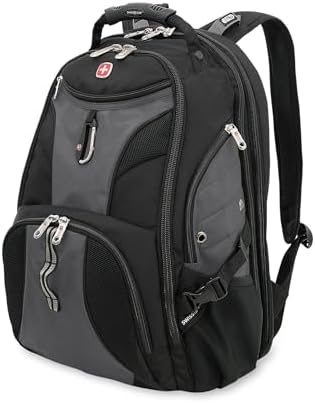
A large laptop backpack can look like the safe answer until the laptop body, airport rules, rain exposure, or pocket layout changes the result. The SwissGear 1900 ScanSmart works best for standard 15- to 17-inch work carry, while bulky 17-inch laptops and travel details tighten the margins. This article covers only the 31L / 17-inch version.
Scorecard
The SwissGear 1900 ScanSmart lands in the Exceptional tier, which fits a bag with strong overall satisfaction but still leaves real fit and travel limits to read closely. The scorecard points to a strong general reception, not a guarantee that every laptop body, rain setup, pocket load, or roller-bag setup will work.
| Field | Value |
|---|---|
| DVSS Score | 90.24 |
| Satisfaction Tier | Exceptional |
| Dissatisfaction Score | 6.97% |
| Critical Dissatisfaction Rate | 6.02% |
Based on buyer feedback patterns, not hands-on testing. See how this scoring works.
At 6.02%, the serious-problem share stays limited, but it still points to the laptop-fit, weather, roller-bag, pocket, and zipper limits below. The scorecard does not prove laptop fit, bottom protection, zipper life, comfort under every load, or weather protection.
The main takeaway is simple: satisfaction is high, but the laptop body shape, rain exposure, roller-bag carry, pocket placement, and zipper behavior still determine whether this bag fits the job.
Quick Take
- Best For: standard 15- to 17-inch work laptops, heavy organized carry, and travel days where the load justifies a large backpack.
- Not For: bulky 17.3-inch gaming laptops, waterproof laptop carry, built-in roller-bag stacking, or compact daypack use.
- Top Strength: It gives work travelers plenty of organized space for laptops, accessories, paper, and daily carry-on items.
- Main Limitation: the familiar cues — 17-inch label, ScanSmart design, padding, pockets, and durability reputation — still need to be defined.
Decision Matrix
| Your setup | What it means before buying |
|---|---|
| Standard 15- to 17-inch work laptop | Best fit match |
| Bulky 17.3-inch gaming laptop | Screen size alone is not enough |
| Airport screening convenience | Useful only when the checkpoint allows it |
| Heavy work or travel load | Stronger match than light daypack use |
| Rain-heavy laptop carry or roller-bag stacking | Plan extra protection or compare other bags |

The 17-inch label stops at a bulky laptop chassis
The laptop screen label is the fastest buying check.
Dell XPS 17 tight fit versus 17.3-inch gaming no-fit
A large screen is not the same as a safe large-laptop fit.
The laptop compartment narrows where bulky chassis need more clearance. That upper shape gives standard work-laptop bodies more room than deeper or oversized laptops. The removable foam bar can hold the laptop position more securely, but it does not widen the compartment.
In some setups, a large laptop can change what the compartment can safely accept. The 17-inch label helps for many work laptops, but it does not fit every bulky 17-inch chassis. The bag looks like the safe pick for a large laptop until a bulky chassis reaches the taper that a normal 17-inch work laptop may never hit.
- Work-laptop support: 16-inch MacBook Pro, HP ZBook, Dell Inspiron, and a 17-inch engineering laptop fit the bag’s strongest laptop range.
- A tight, large laptop case: the Dell XPS 17 belongs in the body-dependent group.
- Gaming laptop warning: one 17.3-inch gaming case blocks a universal-fit claim.
- Oversize claim limit: 18.4-inch and 19-inch ideas should not become buying promises.
The laptop’s body shape matters more than the screen size here.
| Your laptop body | How the fit works |
|---|---|
| Standard 15- to 17-inch work laptop | Best work-laptop match |
| Dell XPS 17 | Body shape matters here |
| 17.3-inch gaming laptop | Do not treat as automatically safe |
| 18.4-inch or 19-inch idea | Not established as a reliable fit |
This bag makes more sense for standard work laptops than bulky gaming or oversize chassis.
Bottom contact and laptop thud
Padding helps the carry story more than the impact story.
The base padding supports everyday laptop carry, but hard-floor contact raises the question of protection. Retaining parts can help keep the laptop positioned inside the compartment. That is different from proving the base can absorb rough set-downs with an impact-sensitive laptop.
Padding is part of the laptop story, but the bottom edge still needs a separate caution. The padded, sturdy feel can mask the two areas that still require caution: bottom contact and wet carry. After seven years of daily work and international trips, one laptop zipper opened while the internal strap kept the laptop from falling out.
- MacBook set-down: a thud case keeps the base from becoming a broad impact claim.
- Small laptop strap fit: a 13-inch MacBook barely fit the Velcro strap.
- Retention backup: the internal strap kept a laptop inside after a zipper failure.
The laptop changes from protected carry to impact concern when the bottom edge meets a hard surface.
| Laptop protection setup | What to add or avoid |
|---|---|
| Normal padded laptop carry | Matches the strongest support |
| Hard-floor set-downs | Careful handling matters |
| Impact-sensitive laptop | Add a sleeve or compare stronger protection |
Keep the padding claim narrow when hard-floor contact matters.
Half-height side laptop access
This access style suits side-loading better than top-loading.
Opening the laptop changes the loading motion. Access comes from one side, and the zipper reaches about halfway up the bag. That layout places the laptop in the compartment differently than a full top-loading sleeve does.
- Side-only loading: laptop entry is not a full top-opening motion.
- Retention concern: One setup reported the zipper opening on its own.
- Contained case: the laptop stayed in place in that setup.
The access tradeoff is loading style, not only laptop capacity.
| Laptop access preference | How this design works |
|---|---|
| Side-loading is acceptable | Works with this layout |
| Full top-loading is important | Another laptop-sleeve layout may fit better |
| Proven self-opening failure needed | Not established by this setup |
Keep this as an access-shape caution, not a failure claim.
ScanSmart helps only when the airport lets it
The airport decides whether the feature saves time.
Lay-flat screening versus laptop-removal rules
The checkpoint decides whether ScanSmart saves the step.
The ScanSmart section opens flat for screening. That helps only when the checkpoint accepts that setup, because airport rules, bin size, or laptop-removal instructions can still cause the laptop to be placed outside the bag. The dedicated laptop area also takes up space that may otherwise help the middle pocket.
ScanSmart can help at a checkpoint, but it does not make every airport let the laptop stay inside. The ScanSmart layout looks like a shortcut, but the checkpoint still decides whether the laptop stays inside.
- Faster checkpoint setup: Some travelers avoid pulling everything out.
- Airport-rule setup: Some checkpoints still require the laptop to be presented separately.
- Storage tradeoff: the ScanSmart area can make the middle pocket feel smaller.
The ScanSmart section works differently depending on what the checkpoint allows that day.
| Airport situation | What changes at the bin |
|---|---|
| Checkpoint accepts lay-flat scanning | ScanSmart can reduce unpacking |
| Airport still wants laptop removed | The feature no longer saves the step |
| You value middle-pocket space most | The dedicated laptop section may feel costly |
Treat ScanSmart as a useful convenience, not a guaranteed shortcut at the airport.
Heavy-load comfort comes with a bulky body
The carry system makes the most sense when the load is real.
Empty bulk and strict tour limits
This is a heavy-carry bag before it is a small travel bag.
The body stays large even before the load gets heavy. Side cinching can tighten the depth when the bag is underfilled, but it cannot turn a 31L laptop backpack into a small daypack. Under-seat use also depends on how full the bag is.
Being big enough for a heavy laptop does not make it a compact vacation daypack. The bag can make sense for laptop travel and still feel wrong when the day calls for a compact daypack.
- Empty-bag mismatch: one return case started before the bag was packed.
- Europe daypack setup: strict tour limits made the bag too large for that role.
- Overhead bin setup: one laptop/tablet travel setup fits overhead.
- Under-seat setup: personal-item use depends on not filling the bag.
The travel role changes when the job is heavy tech carry instead of compact daypack use.
| Travel use | How the bag behaves |
|---|---|
| Heavy laptop travel | Stronger match |
| Not fully packed under-seat use | Conditional support |
| Overhead-bin placement | One positive case |
| Compact vacation daypack | Poor match |
Treat it as a large tech-carry bag, not a low-bulk travel daypack.
25 lbs of groceries and 7–8 kg flight loads
The comfort story is strongest when the load is intentionally heavy.
The straps and back panel spread weight better than the bag’s size suggests. The large interior allows weight to build up quickly. Padded contact can also warm the back or shoulders after hours.
Large capacity supports heavy work carry, but it does not make the bag feel light. The size helps with heavy work gear, but it can also put more weight on the shoulders than a low-bulk carry setup would.
- Grocery-weight setup: 25 lbs sits within the stronger heavy-load use.
- Flight-weight setup: 7–8 kg sits within the stronger balanced-carry use.
- Book-heavy setup: the bag can become heavy before it runs out of room.
- Long-wear setup: padded contact can warm the back or shoulders after hours.
The carry system changes with load weight and wear time.
| Your carry load | How the bag behaves |
|---|---|
| Heavy work or travel load | Stronger match |
| 25 lbs or 7–8 kg class load | Better match than light daypack use |
| Many books | Weight can arrive before space runs out |
| Light daypack expectation | Smaller or lighter bags may fit better |
Use it when the load justifies the size; compare down when low bulk matters more.
Pocket layout changes what your accessories can do
Pocket location matters more than pocket count here.
Flat-item pocket and bulky accessory pressure
The wrong small item can turn storage into a back contact.
The pocket near the back changes comfort by item shape. Flat items sit more cleanly because they stay close to the panel. A non-flat accessory can press toward the wearer rather than simply disappear into storage.
The pocket count looks simple, but the pocket location changes what should go where. The inner pocket works for flat items, but a bulky mouse changes it into a back-contact problem.
- Flat tablet setup: Samsung Galaxy Tab 2 7-inch supports the flat-item side.
- Paper travel setup: tickets and documents suit the same pocket shape.
- Mouse setup: A regular mouse can be pushed into the wearer’s back.
Pocket placement decides whether an item stays useful or pushes back at you.
| What you put there | Where it belongs |
|---|---|
| Papers or tickets | Back-facing pocket works well |
| Flat tablet | Back-facing pocket works well |
| Regular mouse | Better away from the wearer’s back |
| Bulky small accessory | Better in a roomier front pocket |
Keep flat items near the back and move bulky accessories elsewhere.
Front pocket spill and lower-pocket storage
Some pockets add room, while others change how the bag opens.
The front pockets do not all use space the same way. A loaded upper pocket can pull the flap down when the main compartment opens. The lower front pocket expands outward, while the side zip pockets can take up space in the main compartment.
The pocket count looks simple, but the pocket location changes what should go where. The top front pocket is convenient until the main flap drops while that pocket is left open.
- Mouse and headphones: the upper front pocket is useful for quick-access items.
- Open-pocket penalty: contents can dump when the loaded flap falls.
- Gym-item setup: the lower front pocket is designed for toiletries or gym use.
- Bottle-in-side-zip setup: a 24oz bottle or thermos can reduce the main-compartment room.
The front and side pockets do not all add space the same way.
| Pocket location | What changes when packed |
|---|---|
| Upper front pocket left open | Spill risk rises when the flap drops |
| Lower front pocket | Adds outward room |
| Side zip pocket with bottle | Borrows main-compartment space |
| Side mesh pocket with 24oz bottle | Better bottle placement |
| Larger bottle | Fit becomes less certain |
Use quick-access pockets carefully, and treat side-zip storage as borrowed room.
Rain and padding need narrower expectations
Protection claims are split between water, zippers, and bottom contact.
Water shedding versus zipper seepage
Rain protection stops before the waterproof claim.
The shell can resist some wet contact without sealing the bag. Exterior fabric may shed water, while zipper areas or interior fabric can still become the weak point. That difference matters most when damp contents would damage laptop gear.
Water shedding is useful, but it is not the same as keeping laptop gear dry in heavy rain. The padded, sturdy feel can mask the two areas that still require caution: bottom contact and wet carry.
- Storm-positive setup: some wet-weather use says water sheds.
- Rain-walk setup: damp interior blocks a waterproof read.
- Downpour setup: drying the bag and its contents is part of the consequences.
Wet laptop carry needs a narrower read than “sturdy fabric.”
| Wet or impact setup | What to add or avoid |
|---|---|
| Brief wet exposure | Light wet use is the better match |
| Heavy rain or sudden downpour | Add rain protection |
| Laptop gear in wet weather | Do not rely on waterproof protection |
| Hard-floor laptop contact | Add care or separate sleeve |
Add protection when wet contents or hard contact would create a real risk.
Roller-bag travel needs a separate attachment plan
The rear panel is the airport-travel catch.
Rear panel without pass-through strap
Roller luggage needs help outside the bag.
The back of the bag has no built-in roller connector. The top handle still matters for hand carry, but its position does not make it work like a rear strap on roller luggage. A separate bungee can add the connection that the backpack itself lacks.
The travel shape does not include the roller-bag strap that many airport setups expect. The travel shape suggests airport convenience, but the missing rear strap changes the moment a roller suitcase is set up. In one heavy travel case, the top handle started showing wear around year seven after hundreds of flights.
- Roller-handle expectation: this travel setup exposes the missing attachment point.
- Hand-carry positive: the top handle still has support when used by hand.
- Named add-on: Travelon Bag Bungee supplies the connection that the bag does not include.
- Rolling-carry limit: no wheel system is present.
Roller-bag carry requires a separate decision because the rear panel has no strap.
| Roller-bag setup | What you need to plan |
|---|---|
| Backpack carried on shoulders | Built-in straps are the intended carry |
| Backpack carried by hand | Top handle has support |
| Backpack stacked on roller luggage | Add a bungee or compare pass-through bags |
| Rolling carry | Choose a wheeled option instead |
Choose shoulder or hand carry, or plan a separate attachment for roller luggage.
Long durability praise still needs zipper guards
The long-use story is strong, but the closure details decide the caution.
Older praise and newer zipper complaints
Long-use trust needs a current-version caution beside it.
The durability story is strong, but it is not one-note. Long-term wear can leave zippers, straps, seams, and fabric working for years, yet that does not prove exactly how long every unit will last. Newer zipper feel, fraying, sticking, and perceived construction changes keep the current version read as narrower.
The long durability record should sit beside newer complaints about zipper feel and stitching. A familiar model name builds trust, but newer zipper and fabric complaints still need a place alongside the long-term praise. Several years of daily work and airport use can support the durability story without erasing the zipper-specific cautions.
- Twelve-year setup: long-use wear supports the durability story.
- Seven-year zipper setup: laptop zipper failure keeps the claim bounded.
- Eight-year airport setup: pocket pulls can spill contents during movement.
- Early newer-unit setup: fray and sticking before a year adds version caution.
- Prior-owner comparison: a stiff zipper feel can challenge brand trust expectations.
Durability requires both the long-term benefits and the failure cases.
| Use period | What the feedback points to |
|---|---|
| Several years of daily or travel use | Strong long-use result |
| Around seven to eight years | Zipper and handle cautions appear |
| Before the first year in one newer case | Version-risk caution |
| Current-unit certainty | Not established |
Count the long-use praise, but keep zipper timing and version risk visible.
Zipper-pull position during airport movement
A closed pocket can still behave differently in motion.
The closure risk changes when the pulls sit at the top. In movement, that position can make a pocket less secure than the same zipper with the pulls kept elsewhere. A sewn zipper backstop helps with over-travel, but that is a different issue from pull placement.
After years of airport use, zipper pulls left at the top could open during movement, spilling pocket contents. Long-term zipper praise should not erase the smaller-closure habit that affects pocket security.
- Airport movement setup: the problem appears while the bag is being carried.
- Bigger-pocket pulls: the issue concerns larger-pocket zippers.
- Spill consequence: contents can spill out of the pocket when the pocket pulls open.
- Backstop detail: the sewn stop protects against a different zipper problem.
Zipper behavior changes by position, not just by material quality.
| Zipper situation | What can change |
|---|---|
| Pulls left at the top | Pocket security weakens in motion |
| Pulls kept to the side | Spill risk can drop |
| Sewn zipper backstop | Over-travel gets support |
| Laptop zipper failure | Retention becomes the next concern |
Keep the zipper story specific: backstops help, but pull position still matters.
Who should skip it
These are the setups in which the strongest mismatch occurs.
| Your setup | Why this may miss |
|---|---|
| Bulky 17.3-inch gaming laptop | Screen size alone does not settle the fit |
| Heavy rain laptop carry | Water shedding does not make it waterproof |
| Roller suitcase travel without add-ons | No built-in rear attachment is present |
| Compact vacation daypack use | The body can feel too large before packing |
| Bulky accessories in every pocket | Some pockets press, spill, or borrow space |
| Rolling carry | The backpack has no wheels |
Move on when your laptop, rain, roller luggage, daypack, or pocket expectations hit these limits.
Buy or skip?
Buy the SwissGear 1900 ScanSmart if the main need is a large, organized work or travel backpack for standard 15- to 17-inch work laptops, chargers, papers, tablet carry, and heavier daily loads.
Skip it if the appeal depends on treating those same big-backpack cues as absolute: automatic bulky 17.3-inch fit, waterproof laptop carry, built-in roller-luggage attachment, compact daypack use, or zipper certainty. The central tradeoff is size-backed organization versus the physical limits that come with that size, pocket count, ScanSmart layout, padding, weather shell, and long-use reputation.
Check the Price: SwissGear 1900 ScanSmart 31L.
See More Options: If the 31L body still sounds right but laptop fit is the concern, compare large laptop backpacks for heavy tech carry and bulky laptop fit limits. If the problem is daypack bulk, compare smaller laptop backpacks for daypack-style carry. If the bottom-contact caution matters more than backpack capacity, consider where to add a sleeve when bottom-impact protection matters more, and do so.
