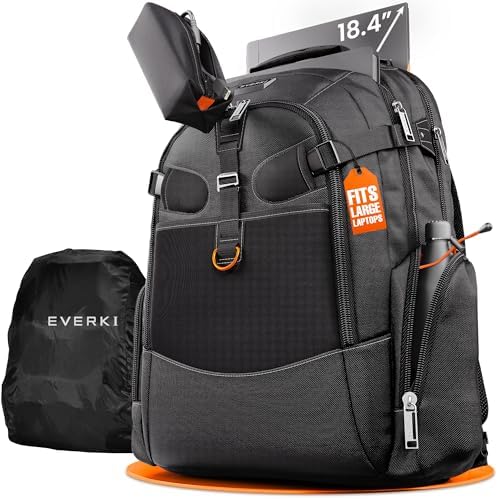
The Everki Business 120 is a 40L laptop backpack built to solve a specific problem: the laptop is too wide or thick for standard work bags, and the gear pile is too large for a slim commuter pack.
Keep it on your list only if three checks work in your favor — your laptop clears the Business 120 pocket and zipper path, your packed 40L load is still worth carrying, and your real need is more than a sleeve, a smaller laptop backpack, or a tech pouch can solve.
Scorecard
The Everki Business 120 posts a 92.92 DVSS Score in the Exceptional tier, but that score does not tell you whether a laptop clears the 20.5 x 13 x 2 inch Business 120 pocket, whether the lower laptop corner stays inside the padded area, whether the zipper closes cleanly around a full work kit, or whether a packed 40L bag fits under your airline seat.
| Metric | Value |
|---|---|
| DVSS Score | 92.92 |
| Satisfaction Tier | Exceptional |
| Dissatisfaction Score | 4.77% |
| Critical Dissatisfaction Rate | 4.33% |
Based on buyer feedback patterns, not hands-on testing. See how this scoring works.
The 4.33% Critical Dissatisfaction Rate traces back to three specific points: laptop corner coverage, loaded zipper closure, and current-model details, where Titan-era history may not apply to the bag you receive. The fit, stress-point, and think-twice sections below work through each of those checks before the verdict.
Quick Take
- Best For: Large-laptop work and travel users carrying a heavy tech kit.
- Not For: Low-bulk daily carry, guaranteed under-seat travel, bottle-first use, or Business 120 Pro-specific certainty.
- Top Strength: Large laptop space plus dense organization for devices, chargers, cables, files, and work tools.
- Main Limitation: The 40L size adds bulk, increases load weight, introduces travel uncertainty, and requires variant checks.
Why screen size is the wrong shortcut
The Business 120 is strongest when ordinary laptop backpacks stop working. The catch is that laptop fit is decided by the chassis, not the screen size printed on the laptop’s name.
The pocket number that matters
The Everki Business 120 belongs on your list if ordinary laptop backpacks fail your workstation or gaming laptop, but the real test is not the screen size — compare the chassis and any sleeve stack against the 20.5 x 13 x 2 inch Business 120 pocket, because a device measuring 17 x 13.8 x 2.3 inches can still push past the laptop-pocket limit.
Width, depth, thickness, corner shape, and zipper clearance all matter once the backpack is packed with the rest of your work kit. Measuring the screen diagonal and stopping there is the shortcut that creates the return-window problem.
Large examples still need measuring
Alienware, MSI, Asus ROG, Dell Precision, Acer Predator, Alienware M18, Asus ROG G752VL, Dell Precision 7770, Dell Precision 6800, and an old Dell 17.3-inch XPS all belong in the large-laptop conversation — but each model still needs its own width, depth, and thickness check before you treat the Business 120 as a confirmed fit.
Use the Asus G752 profile (18.2 x 13.1 x 0.9 inches) as a comparison point. If your laptop is wider or thicker, the zipper path can become the limit before the screen size looks wrong.
The sleeve can become the problem
A laptop sleeve can help if you worry about bottom or corner protection — but it also adds thickness to the pocket, so measure the laptop inside the sleeve before buying.
Keep the 20.5 x 13 x 2-inch pocket number tied to the Business 120. The Pro version does not have separately confirmed pocket dimensions in the active evidence, so do not carry that figure across to a Pro purchase decision.
What 40L really changes
The size is why this backpack exists, but the load you pack inside it determines whether the choice still makes sense.
The work kit is trying to swallow
The Everki Business 120 makes the most sense when your work kit has grown beyond a laptop-and-charger setup — laptop, tablet, chargers, power banks, keyboard, mouse, hard drives, documents, books, cables, tools, and occasional clothes can all belong in the same 40L decision, but load examples ranging from 25–30 lbs to a possible 45 lbs turn packing space into a carry-weight check.
Mobile work is where this purchase makes its strongest case: iPad, keyboard and mouse, encrypted hard drives, legal files, HDMI and DisplayPort cables, power bricks, ANC earbuds, mechanical keyboard, precision screwdriver sets, magnetic project mat, repair tools, full-sized wireless keyboard, mouse box, and 10-foot HDMI and DisplayPort cables all point to a backpack built around dense tech carry. A Nintendo Switch, controller cases, or a small camera case can fit into the same 40L load, but those items belong as secondary packing additions — not the reason to buy this backpack over a gaming carry bag or a camera bag.
Organization favors cables over bulky extras
The dense pocket layout, orange interior, accessory separation, and tablet and laptop areas are most helpful when the load consists of cables and devices. Bulky non-tech extras can fight the compartments rather than disappear into them.
An accessory pouch or toiletry bag can fill in around the main kit, but adding those items does not reframe this as a toiletry bag, general luggage, or travel-lifestyle backpack. The product’s identity is tech carry, and the compartments reflect that.
The weight shows up after the pockets fill
Compression straps can reduce the bag’s depth when it’s not full, but they do not turn a 40L large-laptop backpack into a slim commuter bag.
If the real problem is cable sprawl rather than laptop or backpack capacity, a tech pouch or cable organizer solves the clutter without asking you to carry a larger bag.
The size follows you through the trip
A big laptop backpack can make travel packing easier, but it can also make travel movement harder. That split matters most after the bag is fully packed.
Padding does not shrink forty liters
The Everki Business 120 has the carry hardware a large tech backpack needs — padded straps, padded back panel, adjustment support, and compression support — but once the kit moves toward 25–30 lbs, 30–35 lbs, 40 lbs, 12 kg+, or a possible 45 lbs, comfort depends on your body size, walking distance, and whether a full 40L bag still fits the trip you have planned.
Weigh the packed kit before placing it in the backpack. A load that fills the compartments can still become the reason the shoulder straps, back panel, and your walking distance stop agreeing.
Under-seat space is a weak promise
Do not treat the Business 120 as a guaranteed personal item: check packed dimensions and airline rules before flying, because a full 40L bag can lose the under-seat advantage that a smaller laptop backpack keeps.
If your usual load is just a laptop, charger, and a few documents, the Business 120 can be more of a backpack than the problem needs.
Trolley details need a current-model check
Airport and hotel use fit the backpack’s role, but dense electronics can slow screening, and the luggage pass-through story is contested — verify the current version before counting on trolley compatibility.
Lift the packed bag by the top handle during the return window and check whether hand carry still feels secure. A heavy tech load tests the handle and shoulder straps differently than a light office kit does.
The checks that matter before the return window closes
The Business 120 requires inspection in specific locations. The point is not to doubt every feature, but to test the parts that carry the most risk once the bag is loaded.
The corner your laptop lands on
Check the Business 120 at the points that carry the most risk after packing — laptop corner coverage, loaded zipper closure, top-handle feel, and current-model details — because older Titan history, possible revised units, and a 2024 current-version complaint make inspection more useful than trusting the product name alone.
Check whether your laptop corners sit inside the padded area. A thick chassis that sits past the padding edge means the laptop compartment is not the same as full-device protection.
What a packed zipper closes around
Close the zipper around the full work kit during the return window, as a full load tests the zipper path differently than an empty fit check.
A TSA lock can help only if the zipper pulls match your lock — and lock compatibility is not the same as theft protection.
A rain cover is not a waterproof claim
Use the rain cover as weather management, not waterproofing. Pack the bag first, then check the back, corners, and wind exposure before relying on the cover around electronics.
That limit matters most if the backpack carries a workstation laptop, hard drives, power bricks, or documents when wet.
Titan history does not settle the current bag
Treat Titan and Business 120 history as version-sensitive. Verify the current bag’s straps, handle, zipper, and pocket layout before applying old praise as a current-model guarantee.
The Business 120 Pro should remain a variant note unless you can independently confirm its separate pocket, strap, layout, and travel details before buying.

Who Should Think Twice
This is not the safer pick just because it is bigger. The wrong buyer can end up paying for space that creates the next problem.
Forty liters is too much for light carry
Skip the Everki Business 120 when your real need is low-bulk daily carry, guaranteed under-seat travel, or a clearly documented Business 120 Pro feature set — the evidence for the standard 40L Business 120 is substantially clearer than for the Pro, and neither version shrinks to a slim or personal-item carry bag.
Keep hiking and day-trip needs out of this purchase decision. The product is for work and travel tech carry, not for outdoor-pack use.
Bottle access is not the hidden strength
Do not buy the Business 120 for bottle access first. Rough side-pocket dimensions — around 7 inches on one side and 5 inches on the other by about 6 inches wide — make bottle fit something to check before buying, not a convenience you can count on.
That limitation matters because a 40L backpack can still disappoint if your daily routine depends on quick access to a bottle or a travel mug.
Sleeve-only protection changes the route
If the main worry is laptop protection rather than carrying a large work kit, start with a laptop sleeve before buying a 40L backpack.
The same applies to accessory clutter. When cables, adapters, or chargers are the real problem, a tech pouch or cable organizer may solve the job with less bulk.
Buy or Skip the Everki Business 120?
Buy the Everki Business 120 if your laptop and work kit need a 40L large-tech backpack and the chassis clears the 20.5 x 13 x 2 inch Business 120 pocket; skip it if low bulk, guaranteed under-seat fit, or a lighter daily carry matters more than solving the large-laptop problem.
The strongest reason to buy is the combined fit-and-load problem: an oversized laptop, chargers, tablet, keyboard, mouse, drives, files, and cables in one work-and-travel backpack. The clearest reason to skip is also the product’s advantage — the 40L body invites more gear, and more gear means more weight, more bulk, and less travel certainty.
Before keeping it, pack your real kit, close the loaded zipper, check the laptop corners, and walk with the full load. Those checks decide more than the word “large.”
Cable clutter or sleeve-only protection is a different problem. A tech pouch, cable organizer, or laptop sleeve is a cleaner route for those needs than buying a larger backpack.
Check the Price
See More Options
