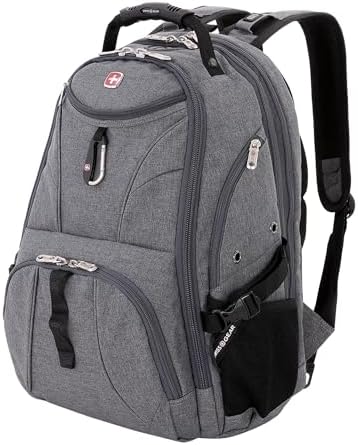
The SwissGear 1900 ScanSmart makes the most sense when you need one backpack for a laptop, charger, keyboard, mouse, papers, books, documents, and daily carry. Before that case holds up, four checks have to clear first: large-laptop clearance, packed bulk, airport routine, and current-build stress points.
Buy it for a larger work kit — but measure your laptop and test the packed bag before keeping it, because a thick 17.3-inch chassis, a full accessory load, or a rolling-suitcase routine can each change the answer.
The scorecard gives context. It cannot run those checks for you.
Scorecard
The SwissGear 1900 ScanSmart’s 90.24 DVSS Score and Exceptional tier position this backpack well for satisfaction. What that score cannot tell you is whether a thick 17.3-inch laptop clears the zipper, whether the bottom edge feels protected when the bag is set down, or whether the handle and zippers hold up after daily packed carry.
| Metric | Value |
|---|---|
| DVSS Score | 90.24 |
| Satisfaction Tier | Exceptional |
| Dissatisfaction Score | 6.97% |
| Critical Dissatisfaction Rate | 6.02% |
Based on buyer feedback patterns, not hands-on testing. See how this scoring works.
The physical checks carry the real risk: zipper travel under a packed work kit, handle and seam stress, bottom-edge padding, rain along the zipper path, and clearance for large laptops. The fit, travel, stress-point, and think-twice sections below work through each of those risks in turn.
Quick Take
- Best For: Larger work kits with a laptop, charger, keyboard, mouse, papers, books, documents, and daily items.
- Not For: Low-bulk carry, guaranteed 17.3-inch gaming-laptop fit, waterproof confidence, or built-in rolling-luggage attachment.
- Top Strength: Compartment-heavy organization for a full work kit.
- Main Limitation: Laptop clearance, packed bulk, rain exposure, trolley use, and current-build stress points all need checks before committing.
Seventeen Inches Is Only the Start of the Fit Check
Fit gates everything else. The work kit, travel access, and comfort story only matter if your laptop clears the bag without forcing the zipper.
Chassis, not screen size
The SwissGear 1900 ScanSmart has strong 17-inch laptop fit material, but the fit check shifts once a 17.3-inch or thick gaming chassis enters the decision — measure width, depth, thickness, and zipper clearance instead of trusting screen size alone.
Treat the fit numbers as checkpoints, not final specs. Compare the 17 x 12.5 x 2.5 inches and 17 H x 14.5 L x 2.5 W cues against the current listing, then leave room for the zipper path before buying.
Two laptops, one protection problem
Two laptops may fit in some setups, but carrying a second device changes the protection question entirely — use a sleeve or added padding if both ride inside the bag at the same time.
Bottom padding is not a reason to skip the check. Set the packed bag down and feel where the laptop’s lower edge sits before trusting the backpack with a heavier device.
The 31L label and the 17-inch trail
Read 31L as a size label, not as a shortcut for every fit or capacity claim. The strongest laptop-fit material clusters around 17-inch laptops, so keep those two facts separate before treating the size label as a fit guarantee.
A separate 27.4-liter cue and an 18.5 x 13.5 x 9-inch dimension cue should not replace the 31L label — confirm the current listing if the exact capacity or packed dimensions affect your purchase. Small extras follow the same rule: RFID, USB, headphone port, sunglasses loop, key clip, D-ring, carabiner, side loops, and compression straps should only matter if the current listing confirms them.
The Work Kit Is Why This Bag Stays in the Running
Once the laptop clears the fit path, the 1900 ScanSmart makes more sense. Its strongest case is the messy workday, not a minimalist commute.
A keyboard, mouse, and charger need real homes
The SwissGear 1900 ScanSmart earns its work-backpack case by taking the full kit seriously — laptop, charger, keyboard, mouse, papers, books, documents, lunch, small peripherals, and daily items — but the same pocket-heavy layout can become extra packing work when your accessories do not match its compartments.
Pack your normal kit before keeping the bag, because the strongest use is a complete work setup: charger, keyboard, mouse, documents, small peripherals, and a daily carry-all have a reason to be inside, and unused pockets can turn organization into clutter.
Too many pockets can become another packing job
The one-bag appeal is clearest when it replaces an overpacked laptop case, handbag, lunch bag, and water-carry setup. If your workday already runs on separate pouches, the backpack’s pockets may reduce the number of items you carry without replacing every organizer.
Work, school, commute, college, and daily carry all fit the use map, but the main decision should stay on the larger work kit — school use is mixed, and the bag’s size can become too much for lighter daily carry.
Small tech may still need its own pouch
If chargers, cables, mouse, and keyboard still sprawl after packing, keep a tech pouch or cable organizer in the plan — the backpack’s internal pockets do not automatically solve every small-item problem.
The bag can be read as work-appropriate, but it is not a formal briefcase substitute. If the setting is client-facing or dressier, compare a more professional laptop-carry option before buying.
ScanSmart Helps, but Travel Has a Second Problem
The ScanSmart section can help at the airport, but checkpoint access and suitcase handling are separate decisions. That split matters before this becomes your travel laptop backpack.
Checkpoint removal
The SwissGear 1900 ScanSmart can make sense for airport travel, international travel, and short-trip laptop carry — but ScanSmart access does not finish the travel job. TSA may still ask for the laptop or tablet, and the missing luggage pass-through leaves rolling-suitcase users with a separate problem.
Pack the laptop and tablet so they can come out quickly, because a lay-flat section does not control the checkpoint rule in front of you.
The trolley gap
If the backpack needs to ride on rolling luggage, verify the current model before buying. The luggage pass-through or Add-A-Bag story is uncertain enough that a bag bungee or a different laptop backpack may be the cleaner travel choice.
Rolling luggage aside, this remains a backpack decision. The no-wheels detail and missing luggage pass-through keep the travel check focused on how it rides with your body and your suitcase — not on whether it replaces luggage.
Under-seat only when restrained
Under-seat use depends on packed size, not just the backpack name. Keep the load restrained and check airline rules before using it as a personal item, because a fully packed large laptop backpack can lose the under-seat advantage that made it attractive.
Bottle carry follows the same logic of restraint. A 24-oz bottle has support, but larger bottles are too variable, so you should check the bottle diameter before relying on the side pocket.
The Return-Window Test Belongs on the Stress Points
Long-use stories make the build worth considering, but they are not a reason to skip inspection. The decision sits on the parts that carry the load and close under pressure.
Old SwissGear trust, current-bag checks
The SwissGear 1900 ScanSmart has enough long-use and carry-comfort material to stay in the conversation, but the return-window test should focus on the stress points that decide packed use: zipper travel, seam tension, stitching, handle lift, strap comfort, and rain exposure along the zipper path.
Older SwissGear trust is a useful context — not a replacement for a current-bag inspection. Check fabric, seams, stitching, zippers, and handle attachment after loading your normal work kit.
Zippers after the bag is full
The zipper question starts after packing, not while the bag is empty. Open and close every zipper around your laptop, charger, and accessories before the return window closes, because packed corners and overfilled pockets reveal strain that an empty bag hides.
The top handle can be useful for quick lifts, but it belongs in the stress-point check, too. Lift the packed bag during the return window and inspect the attachment points before keeping it.
Padding until bulk takes over
Padded and adjustable straps help the bag stay wearable, but 3.3 lbs, heavy-tech-carry placement, 25 lbs, 7–8 kg, tipping, and bulky-body cues make comfort a packed-load decision, not a spec you can assume from the box.
Do not treat 25 lbs or 7–8 kg as load ratings. Pack your normal load and test your shoulder and back feel before keeping the bag — a large body can feel different once the laptop, charger, documents, and accessories are all inside.
Rain along the zipper path
Treat rain protection as limited: water shedding does not eliminate interior dampness or zipper seepage risk. Use a rain cover or keep electronics sleeved when wet weather is likely.
A poncho or rain cover can solve part of the problem, but neither makes the backpack waterproof. If rain is routine, protect the electronics first and judge the bag as a work backpack with weather limits.

Who Should Think Twice
Each pause point below ties directly to fit, size, travel, protection, or current-build checks — not to a vague buyer category.
Large is the point, not a side effect
Large is the point here. If you want a light daily carry, the same structure that holds the work kit will likely feel like too much bag for a lighter routine.
Waterproofing is not there
Rain exposure is a real risk. If wet weather is routine, the zipper path and interior dampness concern make a rain cover — or a different laptop backpack — part of the decision, not an afterthought.
Security needs a separate check
The lock story is version-sensitive, and no lock is built in. Verify zipper holes and padlock fit before treating the bag as secure storage.
Camera and hiking use stay outside
Occasional use of camera gear or as a day-hiker is not a reason to reframe this as a camera or hiking backpack. Use a padded camera insert and check closure clearance if camera gear enters the loadout — but keep the main purchase decision inside laptop carry.
Compare for the right reason
Travelpro Crew 9 Business Backpack matters if you want a more formal or more luggage-compatible laptop backpack. If Zuca, High Sierra Pro, SwissGear SA1923, Yorepek, or SwissGear 1908 are on your compare list, use each one to check a single specific issue — size, pocketing, travel handling, or business polish — rather than treating them as a ranking.
Color details should not carry the main verdict. Black/Black, Navy Ballistic, Black/Grey, White/Black, Olive Branch, and Grey Heather are variant choices, and the reflective white section is a variant-specific detail rather than a family-wide visibility feature.
Buy or Skip the SwissGear 1900 ScanSmart?
Buy the SwissGear 1900 ScanSmart if your main problem is carrying a large, organized work kit in one backpack. Skip or compare if your decision depends on low bulk, a certain 17.3-inch laptop fit, built-in trolley attachment, waterproofing, or current-build durability you cannot inspect during the return window.
The clearest buy condition is specific: your laptop clears the compartment, your packed work kit feels manageable, and your travel routine does not require a built-in trolley sleeve. The clearest skip condition is equally specific: a thick, large laptop, a rain-heavy commute, a rolling-suitcase routine, or a preference for a lighter daily carry each moves the decision away from this bag.
Do not let price tier settle the verdict. No current price is locked here, so the more reliable decision rests on fit, load, travel routine, and a hands-on inspection.
Check the Price
If the bag fits the decision, start there. If one limit blocks the purchase, the next link should solve that specific limit rather than send you into a broad category search.
See More Options
