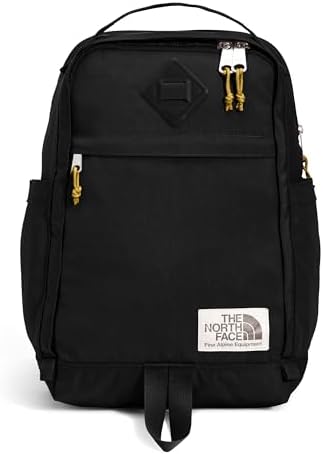
A compact backpack can look like the easy answer until the laptop, binders, or travel setup reaches the tight spots. The North Face Berkeley 16L is strongest for small, slim tech and light daily carry, but the 16-inch sleeve wording needs caution. The fit depends on whether the device and load stay inside its smaller range.
Scorecard
The North Face Berkeley 16L lands in the Excellent tier — encouraging for the right small-tech setup, but not a shortcut around its fit and packing limits.
| Scorecard field | Value |
|---|---|
| DVSS Score | 89.32 |
| Satisfaction Tier | Excellent |
| Dissatisfaction Score | 6.55% |
| Critical Dissatisfaction Rate | 4.50% |
Based on buyer feedback patterns, not hands-on testing. See how this scoring works.
About 4.50% of ratings were serious enough to count as critical dissatisfaction, so the main problems below still deserve attention before buying. The score is not proof that the Berkeley 16L will fit every laptop, protect devices from impact, stay waterproof, feel comfortable on every body, or hold up the same way for every owner.
The score is encouraging, but the buying decision still comes down to the sleeve, zipper, 16L body, pocket layout, straps, and protection limits.
Quick Take
- Best For: compact everyday carry with small/slim tech
- Not For: large laptops, heavy school loads, or waterproof/protection certainty
- Top Strength: compact shape, style, and light daily utility
- Main Limitation: tight laptop fit and limited room once packed
Decision Matrix
| Carry setup | What the Berkeley 16L suits |
|---|---|
| 13-inch laptop, tablet, and light daily items | Best match for the bag’s size and sleeve behavior |
| 16-inch MacBook Pro or regular 15-inch laptop | Too risky to treat as a clean fit |
| Binders, books, or larger trip packing | Better compared with a roomier backpack |
| Keys, chargers, folders, and small accessories | May need a separate pouch |
| Water, impact, or camera protection matters | Add protection instead of trusting the bag alone |

The sleeve label does not settle laptop fit
The 16-inch wording only helps once the actual laptop body is considered.
16-inch MacBook Pro and 14-inch Chromebook at the zipper boundary
The safer fit range is smaller and slimmer than the sleeve claim suggests. The laptop sleeve and zipper closure set the real fit limit. Once a larger or thicker laptop reaches the edge of the sleeve, the zipper area can tighten, stall, or become the closure pressure point.
In some setups, the largest fit problems involve the same sleeve and zipper area that shoppers may trust most. The sleeve may sound like the final answer for a 16-inch laptop, but the fit points to a safer small/slim-device range.
A shopper can choose this bag for the 16-inch sleeve cue and still run into a closure problem once a larger laptop body reaches the sleeve edge.
- 16-inch MacBook Pro: This is the largest device tied to no-fit and closure-risk problems.
- 14-inch Chromebook: A smaller screen size can still leave the zipper tight.
- Laptop-corner risk: The issue is not only whether the laptop enters, but whether closure pressure reaches the device.
This table separates small/slim tech from laptop setups that need more caution.
| Laptop setup | Berkeley 16L fit call |
|---|---|
| 13-inch MacBook, iPad, or Surface Laptop-style carry | Safest match for the sleeve behavior |
| 14-inch Chromebook-style carry | Smaller screen, but still needs caution |
| 16-inch MacBook Pro | Too risky to treat as a clean fit |
Treat this sleeve as small/slim-tech friendly, not as a settled large-laptop answer.
Slim Mac-style fit versus regular HP/Dell 15-inch cases
A 15-inch label is weaker than the laptop’s body shape.The laptop sleeve responds to the body profile of the device, not just the screen size. A slimmer laptop can sit differently inside the sleeve than a thicker regular 15-inch laptop, even when both sound similar on paper.
The 15-inch wording does not mean every 15-inch body has room in the sleeve.
- Regular HP/Dell 15-inch laptops: Thicker non-slim profiles have less room in the sleeve.
- Slim Mac-style laptops: A slimmer body gives the 15-inch size a better chance.
- Screen-size shoppers: The risk is assuming the number alone settles the fit.
This table keeps 15-inch screen size separate from laptop profile.
| Laptop profile | What the sleeve suggests |
|---|---|
| Slim Mac-style laptop | More plausible, but still not universal |
| Regular HP/Dell 15-inch laptop | Needs caution before treating it as a fit |
| Screen size alone | Not enough to decide this bag |
Use laptop profile as the safer filter before trusting the size label.
Two small laptops in the back compartment
Dual-device carry has much less margin than single-device carry.The back compartment gives small tech a cleaner fit when it carries one device. Add a second laptop, and the same compact space leaves less room for the rest of the carry.
Padding does not make two-laptop carry roomy; the second small laptop squeezes the remaining margin. Two-laptop carry can look plausible until the second device fills the back compartment.
- 13-inch MacBook plus similar-size computer: This is the two-device setup.
- Snug fit: The second device turns a cleaner laptop setup into a tighter carry.
- Remaining daily items: The back compartment leaves less room for everything else once two devices share it.
This table separates a clean small-tech setup from a tighter two-device setup.
| Device load | Space left in the back compartment |
|---|---|
| One small laptop or tablet | Cleanest supported use |
| Two small laptops | Tight enough to treat as an edge case |
| Larger two-laptop setup | Not supported by the fit pattern |
One small device is the safer use; two devices need caution.
The 16L body works best before the load gets bulky
The 16L limit shows up in binders and trip loads.
Binders, books, and the 30L comparison
The 16L body works best before the load turns bulky. The main compartment is built around compact shared space. It can carry a controlled daily load, but binders, books, trip items, or an oversized laptop can fill the main area and make access harder.
Binder fit depends on what else goes in the 16L main compartment. The bag can make sense as a compact personal item, then feel too small when the trip load becomes more than light daily carry.
- 5-inch binder: This load can work when the rest of the setup stays controlled.
- Six 1-inch binders: That setup gets much tighter when almost nothing else can join.
- Trip-load jump: The 30L comparison shows where compact travel starts to feel too small.
- 17-inch work-laptop fallback: A laptop in the main space makes the rest of the load harder to reach.
This table keeps light school carry separate from full school or trip packing.
| School or travel load | What the 16L body leaves room for |
|---|---|
| Flat files, notebooks, and small daily items | Strongest capacity match |
| 5-inch binder plus a few flat items | Possible, but still controlled |
| Six 1-inch binders | Only plausible when almost nothing else joins |
| Larger trip load | Better compared with a bigger backpack |
The Berkeley 16L fits compact daily carry better than heavy school or trip packing.
Under-seat travel without a luggage pass-through
This works better as a small personal item than a luggage-stacking travel bag. The compact body can make sense for under-seat personal-item carry, but that does not add rolling-luggage hardware. Without a luggage pass-through or suitcase-handle strap, the bag remains a shoulder or back carry piece when paired with a suitcase.
The compact travel appeal works best as a personal-item idea, not as a rolling-luggage or full-trip packing promise.
- Under-seat use: The compact body has a real personal-item travel case.
- No suitcase-handle sleeve: Rolling-luggage setups do not get a stacking feature.
- Larger trip load: The 30L comparison marks the point where compact carry starts to feel too small.
This table separates personal-item travel from luggage-stacking travel.
| Travel setup | What the compact body can handle |
|---|---|
| Under-seat personal item | Strongest travel use |
| Rolling suitcase setup | No luggage pass-through is established |
| Larger trip load | Better compared with a bigger backpack |
Use it as a compact backpack, not as a rolling-luggage companion.
When simple storage stops being enough for tech carry
The pocket layout changes once the main compartment fills.
The front pocket after the main compartment fills
The front pocket is helpful only while the main compartment stays controlled. The front pocket does not behave like separate extra space once the main compartment is packed out. When the main space fills, the available room shifts, and the front pocket can become less useful for quick items.
- Quick-access items: Small items become less reliable when the main space is packed tight.
- Fabric lip: The zipper area can slow access instead of feeling quick.
- Full daily load: The front pocket stops acting like extra space when the bag is packed out.
This table shows when the front pocket still helps and when it gets squeezed out.
| Main compartment load | Front pocket usefulness |
|---|---|
| Light or moderate daily load | Still useful for quick items |
| Full main compartment | Less dependable as extra space |
| Frequent front-pocket access | Fabric-lip zipper caution matters more |
Count the front pocket as helpful only while the main compartment stays controlled.
Two smallish mesh pockets, no key leash, and tech-folder carry
The simple layout works better for light carry than organized tech carry. The internal layout is simple. That can be part of the appeal, but it also means tech, folders, keys, and small accessories have less fixed control than they would in a more structured tech backpack.
The simple layout can look clean at first, then feel underbuilt when the daily load includes tech, folders, keys, and small accessories. The safest public claim is about how the pockets work, not an exact pocket count.
- Two smallish mesh pockets: This organization detail is limited, not organizer-panel deep.
- No keychain leash: Keys do not get a fixed anchor point.
- Tech and folders: This setup makes simple storage feel less controlled.
- Small accessories: A separate pouch may become the cleaner fix.
This table separates simple daily carry from organization-heavy tech carry.
| Daily item need | What the pocket layout supports |
|---|---|
| Simple everyday items | Best match for the layout |
| Tech and folders | Less controlled than a structured tech bag |
| Keys and small accessories | A pouch may be the cleaner add-on |
Simple carry fits the Berkeley 16L better than key, folder, and accessory-heavy setups.
Flat papers beside lunchbox and sweatshirt loads
Flat papers get one useful separation point inside the compact layout.
The separate flat paper compartment gives documents a different place from the bulkier main-compartment items. That split matters when flat papers sit beside items that can press, bend, or crowd them.
- Homework and papers: This is the flat-item setup the layout supports.
- Lunchbox and sweatshirt: These bulky items make separation useful.
- School carry: The benefit is document separation, not full textbook capacity.
This table keeps the document benefit inside the bag’s compact limits.
| School item setup | What the flat compartment adds |
|---|---|
| Papers beside lunchbox or sweatshirt | Useful separation for flat items |
| Full textbook-heavy school load | Not a broad capacity fix |
| Documents needing hard protection | Organization help, not impact proof |
The paper compartment is useful, but it does not turn the bag into a large school pack.
Where comfort depends on frame, straps, and carry style
Comfort praise narrows when strap fit changes.
Short straps on broader shoulders and taller frames
Comfort is most convincing for lighter carry and smaller-frame use.
The shoulder straps can be a strength for compact daily carry, but strap length, stiffness, and contact point change the result. The same small shape that feels easy for one wearer can feel short, stiff, or rub-prone for another.
The compact shape can look comfortable, then feel wrong when the strap length or stiffness meets a broader or taller frame.
- Broader shoulders: Strap length can become the fit concern.
- Taller frames: The compact bag can read too short on the body.
- Tank-top wear: Strap contact can turn into rubbing.
- Petite/light carry: This is the strongest comfort-positive contrast.
This table separates comfort-positive cases from body-fit caution cases.
| Carry fit case | Strap and back feel |
|---|---|
| Petite or light daily carry | Strongest comfort signal |
| Broader shoulders or taller frame | Strap-length caution matters |
| Exposed-shoulder clothing | Rub risk matters more |
| Strap durability sensitivity | Compare before committing |
Comfort is a real positive, but not a universal fit claim.
Cushioned back panel versus stiff daypack feel
Back comfort is a preference split, not a universal promise.
The back panel adds cushion for some buyers, but structure can also read as stiffness. Treat this as a feel preference, especially if you want a softer daypack-style carry.
Where durability and protection claims need boundaries
Strong quality praise still needs named limits.
Early strap, zipper, lining, and stitching failures
The quality signal is positive, but it still needs a failure limit.
The Berkeley 16L can come across as sturdy, but the negative cases name specific parts. Straps, zipper closure, lining, and stitching are the areas that keep durability from becoming a blanket promise.
A few early-use complaints describe the bag falling apart, tearing at the lining or shoulder straps, or failing at the zipper, so the strong quality praise still needs a durability limit. The brand signal is positive, but it should not erase the strap, zipper, lining, and stitching problems.
- After a couple of days: The bag can start falling apart quickly.
- Less than a month: Lining and shoulder-strap tears can appear early.
- Early zipper failure: Zipper problems matter more because the zipper also affects laptop closure.
- Brand confidence: The strongest caution is that failures are tied to specific parts, not vague dislike.
This table keeps build praise and early failure details in the same choice.
| Build area | What to treat cautiously |
|---|---|
| Sturdy, high-quality feel | Positive signal, not a lifetime promise |
| Shoulder straps or lining | Early tear problems need caution |
| Zipper closure | Closure problems matter for both access and fit |
| Zero tolerance for early failure | Compare before committing |
The satisfaction signal is strong, but durability should stay limited by the strap, zipper, lining, and stitching problems.
Water resistance, floating sleeve, and DSLR padding limits
Fit and water resistance are not the same as protection proof.
The Berkeley 16L has useful carry cues, but those cues do not show stronger protection. Water-resistant wording does not establish waterproof sealing, a floating laptop sleeve cue does not establish drop protection, and DSLR fit does not establish padded camera protection.
Water-resistant language does not mean waterproof laptop protection.
This table separates useful carry cues from protection limits.
| Protection cue | What it does not prove |
|---|---|
| Water-resistant or water-repellent wording | Waterproof laptop protection |
| Floating laptop sleeve | Proven drop or impact protection |
| DSLR camera fit | Built-in padded camera protection |
| Wet tech carry | Safe use without separate protection |
Add protection when water, impact, or camera padding matters more than basic carry.

Who Should Skip
| Skip this setup | Main reason |
|---|---|
| 16-inch MacBook Pro or regular 15-inch laptop | The sleeve and zipper behavior does not support a clean large-laptop fit |
| Heavy school or trip load | The 16L body is strongest before binders, books, or trip items take over |
| Structured tech, folders, keys, and accessories | The simple pocket layout may need help from a pouch |
| Rolling-luggage stacking | No luggage pass-through is established |
| Waterproof, impact, or camera-protection confidence | The carry cues do not prove that level of protection |
Buy or Skip?
Buy The North Face Berkeley 16L if you want compact North Face style for small or slim tech, light documents, and a simple daily load. The same compact body that makes it easy to carry also explains its main limits: larger laptops, bulky packing, structured accessories, rolling-luggage use, and stronger protection needs quickly push beyond what the bag safely supports.
Check the Price
See More Options
- For the closest size-class comparison, see compare small backpacks that stay honest about compact laptop fit.
- For larger laptops or heavier tech, see compare backpacks for larger laptops and heavier tech.
- For protection needs the bag itself does not establish; see add separate protection when fit is not enough.
