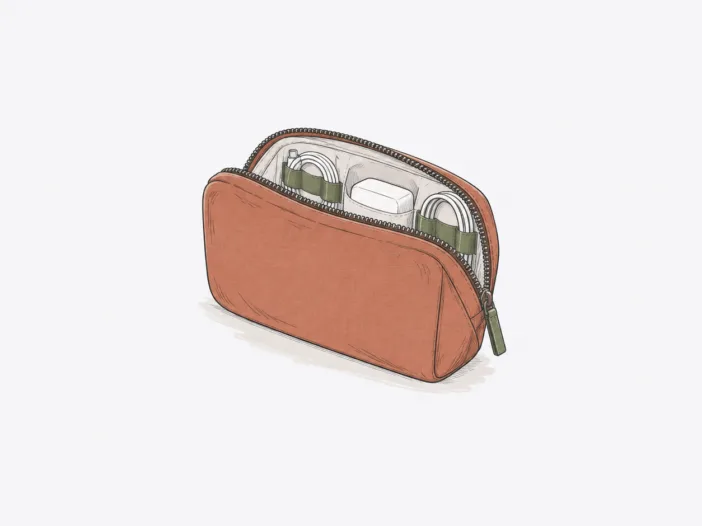
The Bellroy Tech Kit is designed for a daily load built around cables, compact chargers, a mouse, a power bank, and other small-to-medium accessories. Two physical limits define its use: thick, rigid items take up closing clearance before the pouch looks full, and tiny loose items need more secure retention than the open internal storage provides.
Best when your kit is compact enough to close without fighting the shell
Best for: A mixed mobile-work kit built around cables, compact chargers, a mouse, power banks, and similarly sized accessories.
| Decision check | What matters |
| Usable capacity | Mixed compact accessories suit the Tech Kit best; several thick rigid items can make closure tight before the pockets appear full. |
| Small-item retention | Open loops and pockets organize cables and medium accessories well, but tiny loose media or heavier blocks may need more secure enclosed retention. |
| Device fit | An iPad Mini 6 does not fit; tablet or e-reader compatibility should be checked by exact chassis rather than inferred from spare accessory capacity. |
| Host-bag fit | A loaded Tech Kit can fit a main compartment yet exceed tighter sleeve clearance, so compatibility depends on the specific compartment around it. |
| Received-unit quality | Pocket assembly, retention points and zipper operation can vary by unit, making an immediate inspection important after purchase. |
Main deal-breaker: Several thick rigid items can crowd each other across the clamshell and make closure tight before the compartments appear full.
If tiny loose media or heavier blocks must stay positively enclosed, this open-retention layout is the wrong starting point.

Capacity runs out because of opposing thickness, not empty-looking pockets.
Closing clearance, not pocket count, sets the structural limit. When a charger and portable drive are placed opposite each other, their combined thickness can meet as the clamshell closes, forcing the shell outward and making the pouch bulge or resist closure.
Compact, mixed gear preserves closing clearance. A load that includes a Nintendo Switch can still fit, so a pouch that looks full isn’t necessarily stressed if the items don’t create excessive opposing thickness.
Thicker peripherals reach the closing limit faster. A Jabra 510 fits only with effort, so a load made up of similarly thick power or storage accessories can hit the closing limit before every pocket is filled.
| Accessory | Capacity result |
| Logitech M185 | Fits within the same mixed peripheral load. |
| Logitech R400 | Fits within the same mixed peripheral load. |
| Anker Astro E1 | Fits alongside short cables and other small accessories. |
| Jabra 510 | Squeezes in and sits near the thick-peripheral limit. |
Open retention organizes cables better than tiny loose pieces.
Elastic loops and open stretch pockets hold items only if they match the storage geometry and are light enough for the available tension. These do not provide positive enclosure: very small pieces can move into the main compartment, and heavier blocks can exit a loose pocket when the clamshell opens. The Tech Kit separates items more reliably than it contains them.
- Cables and medium accessories: Matching loops and pockets can keep them separated instead of tangled together.
- USB sticks and microSD cards: Tiny loose pieces can escape open storage and scatter into the main compartment.
- Heavier charging blocks: Weak or insufficient pocket tension can let them slip out of their assigned slot when you open the case.
Tablet fit is an exact-device question, not spare accessory capacity.
Accessory space does not determine tablet or e-reader fit. Chassis clearance is device-specific, so screen size or other accessories do not guarantee tablet compatibility.
- iPad Mini 6: Does not fit the Tech Kit, so if this exact tablet must go inside the pouch, the Tech Kit is not suitable.
Host-bag fit changes with the compartment around the pouch
The Tech Kit can fit inside a bag but not in every compartment. The key variable is clearance around the loaded pouch: a main or mesh compartment may have enough depth, while a laptop sleeve can block the pouch if its bulk exceeds the sleeve’s available space.
A loaded Tech Kit also fits inside a Peak Design Everyday Sling 6L beside a Fujifilm X-Pro2 with a Fujifilm XF23mm F2 attached, with no pouch bulge and only a slight bump at the sling’s top when closed.
That combination closes with minimal spare clearance at the top of the sling. If you need to share space in a compact camera sling, the compartment geometry around the pouch matters as much as the pouch’s capacity.
Long-lived appearance does not mean every organizer component lasts as long.
Durability splits into two questions: how the pouch or material holds up over time, and how long small retention components keep working. These signals are related but do not follow the same timeline.
Cosmetic condition can remain strong across very different use periods.
Cosmetic durability holds up for specific periods: nearly 5 months with multiple trips, 5 months of near-daily backpack movement, about 8 months of daily use, around 1 year with good construction and appearance, and up to 4 years while still looking new. These are established benchmarks for sustained cosmetic durability and should not be projected beyond the described use periods.
First wear can reveal issues with stitching or elastic retention.
Component-level failures occur on shorter, separate timelines. Stitching can detach after a few days, increasing slack in the cable area; elastic containment can lose tension after a few weeks, letting contents fall to the bottom; a pen holder can partially detach after about 2 months. The practical risk is localized disorganization while the rest of the pouch remains structurally usable.
Received-unit quality can change both storage and access.
Two quality variables matter: one affects usable storage, the other affects how easily the clamshell opens. These conditions aren’t uniform across all units, so a localized defect doesn’t define the entire product’s construction.
Assembly defects can remove a storage point.
Solid construction can exist alongside isolated assembly issues. Bonding between the outer fabric and inner stiff layer can cause visible puckering, and a pocket sewn shut removes that storage point entirely. The result is a functional loss when an intended pocket is unusable.
Zipper behavior ranges from smooth to stiff or snagging.
Zipper operation ranges from smooth and sturdy to stiff or snagging. A coated zipper can be especially stiff, but not every snag is caused by coating. When you need frequent access, extra zipper resistance directly reduces the convenience of a flat-opening organizer.
The value case depends on how much the layout itself matters to you.
Whether the Tech Kit is worth buying depends on how much its layout and finish matter to your daily carry. Its layout and finish can matter when flat-opening separation is a daily priority, but less so if you only need basic cable-and-charger containment. Your value call therefore depends on the live listing price and how much you actually use those organization benefits.
What to check before buying
- Group your bulkiest accessories before deciding. Judge the combined thickness and placement of rigid chargers, adapters, and drives, not whether each item fits on its own.
- Compare the exact device chassis. If a tablet or e-reader must fit, use the exact device and Tech Kit configuration rather than the screen-size label.
- Match the loaded pouch to the intended host compartment. Compare the space where the Tech Kit will actually sit, not only the host bag’s overall size.
- Inspect the received unit end to end. Open every pocket, inspect seams and retention points, and run the zipper around the full clamshell path.
- Compare the live listing price. Decide whether the current price makes sense for the organization and access benefits you actually need.
Choose it for mixed compact tech; skip it when bulk or containment is the priority.
Choose it if:
- Your daily load is mostly cables, compact chargers, a mouse, power banks, and other small-to-medium accessories.
- You want flat-opening separation more than maximum usable volume for thick rigid gear.
- Your smallest items are large enough to stay secure in open loops or stretch pockets.
Skip it if:
- You regularly need to share the pouch among several thick chargers, adapters, or drives.
- Tiny loose media or heavier blocks require fully enclosed or stronger positive retention.
- You need to carry an iPad Mini 6 inside the Tech Kit.
Check the Bellroy Tech Kit on Amazon
Go slimmer for everyday carry or roomier for gear-heavy trips.
| If you need… | Look at… |
| A slimmer organizer for everyday needs | Aer Slim Pouch Xpac — shifts the carry toward a slimmer everyday profile. |
| More capacity and storage for lots of gear or longer trips | Peak Design Tech Pouch — adds more capacity and storage for larger gear loads or longer trips. |
Discover the Best Tech Pouches to streamline your carry and stay organized.
