Laptop sleeves may seem interchangeable at first, but the setup you carry changes that quickly. Add a charger or mouse, deal with a tight backpack compartment, use a hard-shell laptop case, or want clamshell access, and one sleeve becomes a better fit while another becomes a compromise.
This roundup looks at everyday laptop sleeves for device protection, light organization, and carrying inside a larger bag. There is no universal winner. What matters is which sleeve best matches how you carry your laptop, and whether your exact device and setup closes properly.
Quick Comparison
| Product | Setup it matches | Main trade-off |
| Osprey Daylite Laptop Sleeve | Laptop plus compact charger/cable or small mouse, often nested in a larger bag; brief grab-handle carry | Fit is sensitive to chassis geometry, and a loaded front pocket can add bulk inside a tight host bag |
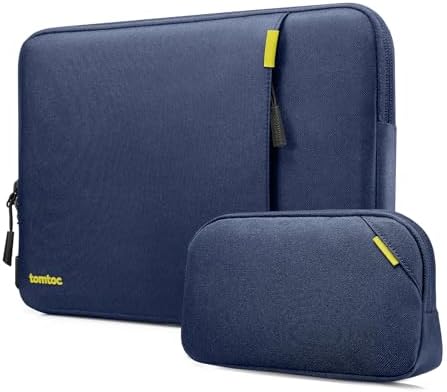
| tomtoc Defender-A13 | Protection-oriented padded sleeve nested inside another bag, with bulky accessories separated into the matching pouch when included | Added padding increases packed thickness; case-on fit and host-bag clearance need checking, and there is no dedicated handle or shoulder strap |
| Thule Gauntlet Sleeve | Device-only carry with zippered clamshell/open-in-case use; accessories carried elsewhere | No accessory storage; fit, zipper closure, and tether handling stay configuration-sensitive |
| Bellroy Laptop Sleeve (14-inch) | Bare, thin laptop within the 312 × 221 × 15 mm envelope; laptop-only carry with magnetic closure | Tight dimensional tolerance, no charger/document storage, and you should not rely on this 14-inch setup with a thin hard-shell case |
What Changes the Choice
- If you want to keep a few compact accessories with your laptop, the Osprey Daylite Laptop Sleeve is the straightforward choice because its front pocket is built for that. The trade-off is more bulk when loaded, so you still need to check host-bag clearance.
- If you want a more protection-oriented padded sleeve, look at the tomtoc Defender-A13. You get a thicker sleeve, and when the bundle includes it, a separate pouch for the charger, mouse, and cables, so you don’t have to overload the front pocket.
- If you want the laptop to stay in a device-only clamshell sleeve, the Thule Gauntlet Sleeve is the clear choice. It fits best when you care about open-in-case use and your accessories already have a separate spot.
- If you want the simplest laptop-only sleeve, the Bellroy Laptop Sleeve 14-inch fits that role as long as your bare device stays within 312 × 221 × 15 mm and the magnets close fully.
- If you keep a hard shell on your laptop, treat fit as something to verify first, not something to assume based on the sleeve size label. Don’t assume Bellroy’s 14-inch sleeve will work with a thin hard-shell case. With tomtoc, a case can make closure tighter. Osprey needs to include the case in the fit check. With the Thule 14-inch sleeve, a MacBook and transparent covers, the zipper closes fully.
Osprey Daylite Laptop Sleeve keeps compact accessories with the laptop without becoming a full carry bag.
The Osprey Daylite Laptop Sleeve occupies the integrated-accessory role in this shortlist. Its main compartment separates the laptop from a front pocket that fits a compact charger, cable, or small mouse. At the same time, the grab handle adds simple point-to-point carry before the sleeve goes back inside a backpack, messenger, duffel, or carry-on-style bag.
The important boundary is geometry, not the number printed on the laptop screen. In the 14-inch sleeve setup with a 15-inch MacBook Air, the laptop fits, while a wider Surface setup reaches a tight rounded-corner/zipper boundary. With the 16-inch sleeve, thin 16-inch-class laptops can fit where wider workstation-style chassis can fail even within a similar nominal screen class.
That makes actual chassis width, height, thickness, and corner geometry the fit check. If you plan to load the front pocket and nest the sleeve, also verify the loaded footprint against the host compartment. With the exact 15-inch MacBook Air + 14-inch sleeve + Osprey Daylite 26+6 setup, the combination fits; tighter host compartments still need their own clearance check.
For the full chassis-fit and host-bag clearance decision, read the Osprey Daylite Laptop Sleeve Product Insight.

tomtoc Defender-A13 Laptop Sleeve favors padded nested carry when extra structure is worth the bulk
The tomtoc Defender-A13 takes the protection-oriented branch. Its soft padded interior and reinforced edge/corner architecture suit buyers who want more structure around the laptop while still using the sleeve mainly as a nested layer inside another bag. When the selected bundle includes the matching accessory pouch, bulky charger, mouse, hub, and cable loads have a separate place instead of pressing against the laptop through the front pocket.
That extra structure also creates the main compromise: packed thickness. A fitted backpack compartment with little spare room can become the limiting interface, especially with a hard shell on the laptop. The Defender-A13 doesn’t add a dedicated carry handle or shoulder-strap attachment, so it works better as a nested sleeve than a stand-alone carry solution.
Size selection still depends on chassis dimensions. The 14-inch variant has internal dimensions of 12.31 × 8.71 × 0.61 inches, while the 16-inch variant measures 14.01 × 9.77 × 0.66 inches internally. Verify the current dimensions for the exact size you are buying, include any case thickness in the calculation, and confirm full zipper closure. If the separate pouch is part of your reason for choosing the Defender-A13, confirm that the specific bundle actually includes it.
If padded thickness, case-on clearance, or the accessory-pouch setup could change your choice, continue with the tomtoc Defender-A13 Laptop Sleeve Product Insight.
Thule Gauntlet Sleeve makes sense when device-only clamshell access matters more than accessory storage.
The Thule Gauntlet Sleeve is the clamshell option in this group. Its key distinction isn’t extra organization; it is the ability to keep the laptop in a slim zippered sleeve and use the open-in-case workflow, with chargers, mice, and other accessories carried elsewhere.
Screen diagonal alone is not enough for sizing here. In the specific 14-inch setup with a MacBook and transparent protective covers, the zipper closes fully. In the 16-inch setup with a MacBook Pro 16, the laptop fits, while smaller 13-inch laptops can move more internally.
Practical checks include full zipper closure, acceptable device movement, and the tether/closure sequence. The Gauntlet is less convincing when you need integrated accessory storage or secondary retention independent of the zipper. If heavy-impact, crush, or sharp-corner protection is a purchase requirement, verify that capability separately rather than relying on this role. If it will live inside another bag, verify the loaded sleeve against that host compartment as well.
For a closer look at clamshell use, closure, and device movement, see the Thule Gauntlet Sleeve Product Insight.

The Bellroy Laptop Sleeve 14-inch is the minimalist route for a bare laptop in a strict-fit envelope.
In this roundup, the Bellroy role centers on the 14-inch Laptop Sleeve. That version has a maximum laptop envelope of 312 × 221 × 15 mm, one laptop compartment, no additional notepad sleeve, and magnetic closure. It suits a buyer who wants a thin laptop-first sleeve rather than an integrated charger or document storage.
The limitation is simple: there is little reason to buy this configuration unless the bare laptop stays within all three dimensions and the magnets close fully. Don’t rely on the 14-inch sleeve with a thin hard-shell case, and don’t assume compatibility when a device crosses the width, height, or thickness boundary just because it shares a 14-inch screen label. For a larger 15-inch MacBook Air, move to Bellroy’s 16-inch sleeve instead.
Keep the variant boundary intact. Bellroy also offers dedicated 13-inch and 16-inch sizes, but don’t carry over the 14-inch dimensional envelope or organization details. For those sizes, verify the current sleeve dimensions and full closure with the exact laptop before buying.
If the 312 × 221 × 15 mm boundary or bare-laptop requirement is close to your setup, continue with the Bellroy Laptop Sleeve Product Insight before choosing a size.

What to Check Before Choosing
Even once you know which carry role fits, a few product and device checks can still change your decision.
- Measure your actual laptop. Width, depth, thickness, and corner shape explain fit differences that screen-size labels miss.
- Include any hard shell or cover when you measure. Bellroy says a thin hard shell will not fit the 14-inch sleeve, and tomtoc results with hard shells are mixed.
- Check how the sleeve fits in your main bag when it is loaded. tomtoc padding can take up real space, and the Osprey works best when it slides easily into a bigger bag.
- Decide where your charger, mouse, SSD, hub, and cables will go. Sleeves range from a separate accessory pouch to a small outside pocket to just space for the laptop.
- Check the exact size variant before you trust buyer reports. Osprey and Thule evidence depends a lot on size, and for some versions, direct evidence is still limited.
