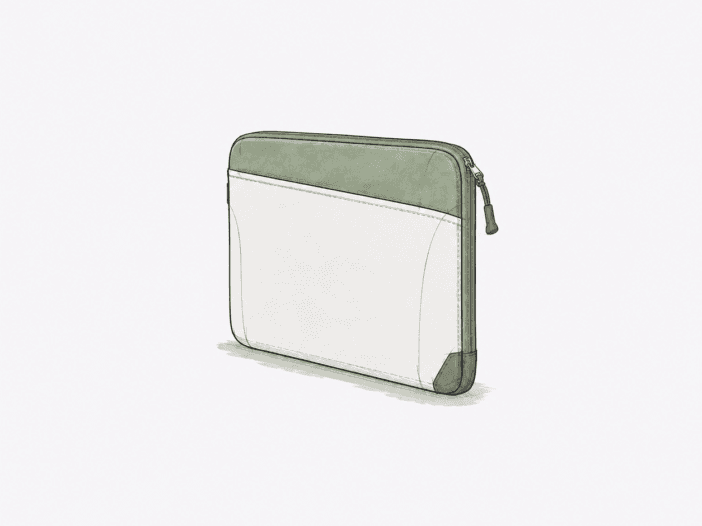
The Osprey Daylite Laptop Sleeve uses a slim, soft-lined build with light padding, a top grab handle, and an external zip pocket. Its structure prioritizes low-bulk device protection and organization, not rigid impact resistance.
Fit depends on physical dimensions, not just the 14-inch or 16-inch label. Chassis shape, thickness, corner geometry, and case-on size determine whether your laptop sits securely, strains the sleeve, or won’t fit at all.
Buy it for verified fit and low-bulk protection.
Best for: a dimensionally compatible laptop when you want a slim sleeve against scratches and smaller knocks.
| Decision check | What matters |
| Laptop fit | The 14-inch or 16-inch label does not guarantee practical fit; chassis shape, thickness, corner geometry, and case-on dimensions determine usable clearance. |
| Protection boundary | Soft lining and thin padding suit scratches and smaller knocks, not hard drops, crush loads, or rigid-impact protection. |
| Front-pocket fit | An 11-inch tablet can fit, but the zipper opening becomes the limiting geometry as tablet size increases; bulky accessories are also less suitable. |
| Carry mode | The top handle works best for retrieval and short carries; sustained hand carry puts more load into the relatively small handle attachment area. |
| Zipper durability | Complete zipper failure occurred in under 3 months under light use; treat this as a specific durability caution, not a general lifespan prediction. |
Main deal-breaker: the nominal screen-size label doesn’t guarantee a practical fit, especially with thicker, squarer, differently proportioned, or case-on laptops.
If your priority differs: choose by full chassis geometry rather than diagonal size alone when close fit matters, and use a more protective system when hard-drop or crush resistance is required.

Laptop geometry decides fit before the size label does
The sleeve’s fixed soft-sided shape makes usable clearance depend on more than diagonal screen size. Rounded sleeve corners reduce the space available along the zipper path, while chassis thickness and aspect ratio determine how close the laptop comes to those corners. A smaller chassis can therefore leave excess movement, while a thicker or squarer one can stretch the sleeve or make closure difficult.
A 13-inch MacBook Pro leaves about half an inch of margin on all sides. This extra clearance highlights the geometry boundary: a laptop can physically fit but still move inside the sleeve if the internal space exceeds the device size. If your laptop leaves similar clearance, expect more internal movement than in a close-fitting sleeve.
The practical boundary is simple: the laptop should enter and close without forcing while retaining controlled clearance. If it stretches the sleeve, interferes with the zipper path, or moves excessively inside, the nominal 14-inch or 16-inch label no longer guarantees a useful fit.
Soft construction favors light protection over hard-impact resistance.
Protection and weather resistance solve different problems here: the lining and foam manage contact and smaller impacts, while the outer fabric adds a limited moisture barrier. Neither turns the sleeve into a rigid or waterproof case.
Thin foam buffers smaller hits but leaves less margin for concentrated impacts
The soft lining keeps the laptop surface separated from rough contact, and the thin foam provides limited buffering for bumps and minor impacts. This construction prioritizes surface protection and smaller hits, maintaining a slim profile instead of adding the rigid structure required for severe impact resistance.
Corner and bottom areas set the strictest protection limit. Where padding is thin or minimal, less material absorbs concentrated impacts. The sleeve suits scratches and everyday knocks, not hard drops or crush-type loads.
Water repellency adds a rain buffer, not waterproof protection.
The 600D recycled-polyester shell has a PFAS-free DWR treatment and is water repellent rather than waterproof. Ordinary rain exposure fits that role, while sustained saturation or immersion calls for a separate waterproof barrier.
The handle and front pocket work best as light-duty conveniences
The handle and front pocket provide retrieval and accessory storage, but they don’t turn the sleeve into a full hand-carry case or deep organizer. Seam loading, pocket depth, and the front zipper opening set the structural limits for these features.
The handle suits retrieval and short carries better than sustained hand carry.
The top handle provides a direct grab point for pulling the sleeve from another bag or for short standalone carry. With a 2.7 lb laptop inside, the load shifts into a small seam area, and the visible seam pull shows under sustained hand carry. Rough contact at the handle also reduces comfort.
For frequent hand carry, the handle functions as a convenience feature, not a padded carry system. Its main role is quick retrieval and short transitions.
Tablet fit is limited by the front-pocket opening before pocket depth alone.
An 11-inch iPad fits in the front pocket while a 14-inch MacBook Pro occupies the main sleeve, showing that the pocket can support a compact two-device setup without displacing the laptop compartment.
An iPad A16 passes through the front-pocket zipper opening, but a larger tablet reaches the passage limit and may contact the zipper during entry. The zipper opening sets the controlling geometry before pocket depth becomes a factor, so your tablet must have enough edge clearance to enter without scraping or forcing.
The front pocket works better for slim accessories than bulky gear.
Flat accessories fit within the pocket’s shallow expansion. Cables, dongles, slim chargers, and small or flat mice match the pocket’s structure, while large power bricks or bulky accessories exceed its reliable capacity. As item thickness increases, usable pocket volume becomes inconsistent, so the front pocket is not designed as a deep tech organizer.
Nested carry has a second fit boundary.
The sleeve functions as a low-bulk layer inside another bag, but the loaded sleeve must also fit the host compartment. A laptop can fit the sleeve, but the sleeve itself may be too large for the intended backpack or messenger compartment. Nested carry depends on both device-to-sleeve fit and sleeve-to-bag fit.
Routine zipper access is easy, but early failure remains a specific caution.
The zipper allows routine access and operation without difficulty, so normal opening and closing is not a limiting factor. Under tighter geometry or with low durability tolerance, reliability becomes less consistent.
A complete zipper failure occurred in under 3 months of light use. This sets a specific early-failure boundary for the zipper, not a general lifespan estimate. If you need high durability, treat this as a material-durability caution.
What to check before buying
- Verify laptop fit. Insert your exact laptop in its normal case-on configuration and confirm the zipper clears the corners without forcing or excessive internal movement.
- Verify tablet clearance. Pass any tablet you plan to carry through the front-pocket zipper opening and confirm it clears the zipper without scraping or pressure.
- Verify host-bag fit. Load the sleeve as intended and confirm it fits smoothly inside the backpack or messenger-bag compartment you plan to use.
Choose it when fit is verified and light-duty protection is enough.
Choose it if:
- Your laptop closes without forcing and still has enough clearance inside the sleeve.
- You want low-bulk scratch and light-knock protection with a grab handle and compact front storage.
- A smaller tablet or slim accessories cover your front-pocket needs.
Skip it if:
- Your laptop stretches the sleeve, interferes with zipper closure, or sits with excessive clearance.
- You need rigid drop/crush protection, waterproofing, or a sleeve designed for sustained hand carry.
- Under-3-month zipper failure with light use is more durability uncertainty than you are willing to accept.
See the Osprey Daylite Laptop Sleeve on Amazon
Still deciding whether host-bag integration matters more than padding or structure? See the full Best Laptop Sleeves comparison →
