The Sony LCS-BP3 is built to consolidate a substantial camera body, lenses, accessories, and a laptop into one backpack. The large configurable cavity sets the carrying envelope. Still, that same space defines the physical limits: a small kit will not fill the cavity tightly enough for secure restraint, a very large lens can reduce layout flexibility, and a fully packed load increases both weight and bulk.
The LCS-BP3 matches your needs when your kit requires the full carrying envelope, and you confirm the fit for your exact camera, laptop, tripod, and zipper function before relying on it. If your priority is compact movement or minimal carry weight, the LCS-BP3 works against that goal by adding bulk and mass.
Choose it for a substantial kit, not simply because it has room.
Best for: a substantial camera-and-lens kit that movable dividers can secure, especially if you also want a laptop in the same padded backpack.
| Decision check | What matters |
| Camera-kit fit | Large kits use the configurable space well, but compact mirrorless kits can remain too loose; very large lenses can also force a less flexible layout. |
| Loaded carry | The bag starts at 3 lb 7 oz (1550 g) empty; the harness distributes dense loads well, but a fully packed setup can become heavy and bulky. |
| Laptop fit | Up to 15-inch notebooks sit within the intended range; 17-inch-class chassis can become difficult to insert, remove, or fit once camera gear occupies adjacent space. |
| Tripod and side access | Tripod stability depends on the lower pocket accepting the folded legs, while a tripod or bulky camera setup can interfere with the side-access path. |
| Long-term durability | Multi-year service is possible, including a 9-year functional case, but earlier main-zipper failures make closure condition a material gear-retention check. |
Main deal-breaker: the LCS-BP3 starts at 3 lb 7 oz (1550 g) empty, and its high-capacity load can become both heavy and physically bulky.
If your priority is a compact mirrorless kit, you need tighter restraint than this bag provides. If you want lightweight carry, you need a smaller or lighter camera-carry format than the LCS-BP3.
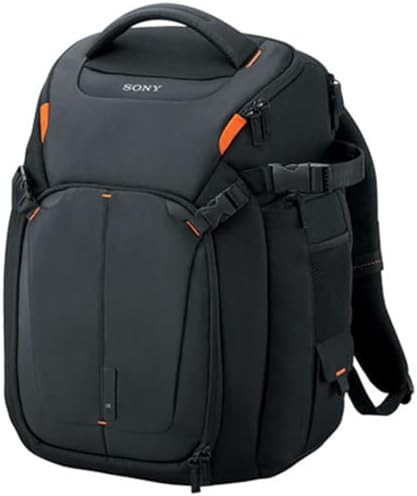
The camera compartment works only when the kit and cavity match.
The camera compartment has two structural limits: equipment that is too large cannot be laid out practically, while equipment that is too small cannot be restrained securely by the dividers. The key question is whether your exact kit fills the space in a way that creates stable, accessible storage.
Large lenses eat up layout flexibility before the bag reaches its nominal capacity.
A Sony Alpha A7M3 fits in the bag with an E PZ 18-110mm F4 G OSS-size lens, placing that substantial mounted setup inside the useful working range. The movable dividers let the cavity shape itself around that geometry, so the LCS-BP3 can preserve a ready-to-use body-and-lens combination when the equipment leaves enough clearance.
A Canon 800mm F11 reaches a different edge: it fits vertically with no wiggle room, while the camera must be detached and smaller lenses and accessories fill the remaining space.
The lens isn’t merely “large”; its vertical geometry consumes enough of the cavity that the layout shifts around it. If keeping the body attached is part of your workflow, check that practical limit before buying.
- Sony 200-600: it sits in a conflicted fit zone—too large in one configuration, yet carryable in another depending on layout. If this lens is central to your kit, verify the exact divider arrangement before relying on it.
A compact kit can fail for the opposite reason.
A large cavity protects only when the dividers make firm contact with your gear. With a compact kit, excess space prevents the dividers from immobilizing the contents, so more capacity doesn’t guarantee a secure fit.
- A7S with lenses: a compact mirrorless setup doesn’t fill the cavity tightly enough for the dividers to immobilize it, so the kit can shift during movement and falls outside the secure-storage range for this bag.
Laptop fit is dependable through the intended range; then extraction clearance becomes the problem.
A 13-inch MacBook has plenty of room in the laptop area, so a smaller chassis sits comfortably within the working range rather than at a squeeze point. Sony’s declared limit is up to a 15-inch notebook PC, so the intended range extends beyond the 13-inch case without requiring a 17-inch-class fit claim.
At the 17-inch class, insertion and removal become separate physical problems. A large chassis can fit when the LCS-BP3 is empty, but may lose extraction clearance once the camera compartment is packed.
Another 17-inch chassis may not fit at all. At this boundary, the screen size label doesn’t determine fit; the actual chassis dimensions and packed camera volume set the practical limit for the sleeve.
| Laptop | In the LCS-BP3 |
| 13-inch MacBook | Has plenty of room, leaving useful clearance inside the sleeve. |
| Lenovo ThinkPad W540 | Fits despite its chunky chassis. |
| HP Pavillion dv7 Notebook | Can fit when the bag is empty, but removal may require unloading camera gear. |
| HP 17 | Does not fit in the exact configuration represented here. |
The harness carries a dense load; it doesn’t make the bag light or compact.
At 3 lb 7 oz (1550 g) empty, the LCS-BP3 starts heavy before you add any gear. The double-strap harness distributes a loaded camera system across your chest and waist so that a heavy configuration can remain comfortable once worn. The large carrying envelope allows more equipment, which increases total mass and bulk around your body. This design balances comfort and weight.
- Empty: 3 lb 7 oz (1550 g) before camera gear, laptop, batteries, or tripod are added.
- Loaded: the harness distributes weight well enough that a heavy bag can remain comfortable on your back.
- Fully exploited: the pack can become very heavy and bulky enough to feel awkward in tight interiors.
Durability can run for years, but zipper security is the component to inspect
Durability comes down to two separate questions: how long the LCS-BP3 remains structurally functional under real loads, and what happens when a critical component fails. These are distinct benchmarks and do not combine into a single predictable lifespan.
Long service is possible, but the observed years are not a lifespan.
The LCS-BP3 can remain structurally functional after 9 years of mixed camera and daily-work carry, with zippers and seams intact and general wear not affecting usability.
Another unit can operate for more than 2 years of extensive travel without issue. These durations set benchmarks for structural endurance under real loads, but do not guarantee a specific lifespan for every unit.
Main-zipper failure changes the risk from wear to gear retention.
Main zipper failure can occur in less than 2 years. Once the zipper no longer retains the compartment, lenses and other gear can fall out, and gear retention is compromised regardless of the fabric’s appearance.
The top handle shows wear differently: fraying can begin while the LCS-BP3 remains usable, with no established timeframe. Treat handle wear and zipper failure as separate component checks, not as stages of a single timeline.
Tripod carry and side access share the same physical space.
The side of the LCS-BP3 supports a tripod externally and must also keep a clear route to the camera door. Both features work only when the tripod’s lower end fits the pocket, and the internal camera layout leaves enough clearance at the side opening.
The lower pocket sets the tripod stability boundary.
A Gitzo T2540 fits the side pocket and two-strap arrangement, so a compatible folded tripod gets support at the bottom plus restraint higher up. That two-point relationship is what keeps the load close to the bag instead of asking one strap to control the whole tripod.
If the folded lower end of the tripod is too large for the mesh pocket, you lose bottom support, and the upper strap must take on more of the retention. A medium tripod can already reach the limit of this fit, so a tripod strap doesn’t guarantee compatibility.
Side access needs a clear removal path.
The side door lets you retrieve the camera without opening the main compartment, but a gripped body reduces internal clearance, and a tripod on the same side can block the removal path. Quick access depends on the exact configuration, so it’s not guaranteed.
- Sony SLT-A99 with grip: the gripped body sits awkwardly at the side entry until you adjust the divider/spacer placement, so if you use a grip, confirm the access path after configuring the dividers.
Secondary protection features work when you use the right containment layer.
Three smaller decisions share a practical boundary: the LCS-BP3 provides protection and travel flexibility only when you add the right containment layer or have enough external clearance. The key is whether your planned configuration includes that last piece of containment or clearance.
Rain protection comes from deploying the integrated cover.
The pull-over rain cover creates an external barrier around the bag. Weather protection depends on placing this cover between the exposed shell and the rain. Without the cover, the backpack does not provide sealed waterproof protection.
Tiny accessories need closed storage.
The open upper bins have corner gaps that let small objects shift into the lower compartment as the bag moves. The zippered mesh pocket blocks this path with closed containment, making it the secure place for memory cards, adapters, and other small items that must not move freely inside the pack.
Overhead travel has more margin than under-seat use.
The LCS-BP3 fits in overhead bins on domestic and international flights when fully loaded, but under-seat placement is limited by packed thickness.
The bag can exceed the seat envelope even if the width fits, and under-seat placement can extend into leg space. Physical seat geometry sets the limit, so check the current airline allowance against your packed bag dimensions before travel.
What to check before buying
- Dry-fit your complete camera kit. Arrange the dividers around the body, mounted lens, and largest telephoto; confirm nothing is forced, and nothing can move freely.
- Test the laptop with the camera area packed. Insert and remove the exact chassis without unloading gear or forcing the sleeve.
- Mount your actual tripod. Seat its lower end in the side pocket, tighten the straps, and confirm the side camera door still opens cleanly.
- Run both main zippers under the intended load. Check full-path tracking and engagement, then inspect the top handle for fraying or separation.
- Recheck the current airline rule before relying on under-seat storage. Compare the carrier’s current allowance with the dimensions of the fully packed bag.
Buy it when one-bag camera capacity outweighs the bulk.
Choose it if:
- You carry a substantial camera-and-lens kit that the movable dividers can restrain securely.
- You want a laptop and a serious camera load in one padded backpack.
- You accept a heavy, bulky packed bag in exchange for capacity and harness support.
Skip it if:
- Your compact mirrorless kit stays loose even after you tighten the dividers around it.
- Low weight and easy movement through tight spaces matter more than maximum camera capacity.
- Your laptop or largest lens needs clearance that the exact packed configuration cannot provide.
- A main zipper on the unit doesn’t track or stay securely engaged under load.
See the Sony LCS-BP3 on Amazon
For alternatives built around different lens loads, laptop needs, and access styles, browse our camera backpack comparison.
