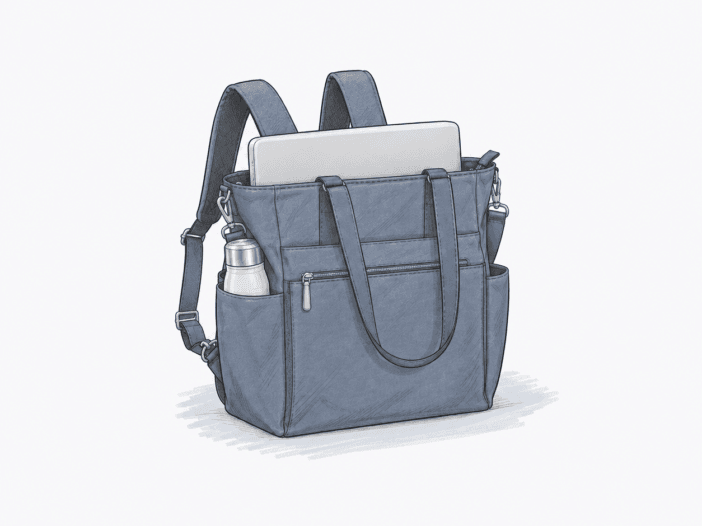
If your daily or travel load is a tablet or 13-inch laptop, a few documents, chargers, a phone, and other compact essentials, this bag matches what buyers actually carry. Most buyer reports describe that kind of setup, especially when the bag sits on a suitcase with the luggage-handle sleeve.
The trade-off appears if you try to use this compact bag as a bigger carry-on or pack it like a full backpack. Bulkier loads fill the pockets, and the single convertible strap can slide, make arm entry awkward, or cause pressure and balance issues in backpack mode.
There is only one size, so the decision comes down to what you carry and how long you expect to use it as a backpack.

Decision Snapshot
| Decision Area | What the Buyer Evidence Suggests | Main Boundary |
| Cleanest fit | Compact air-travel or work loads built around a tablet or 13-inch laptop plus small essentials | Bulky clothing, shoes, larger devices, or carry-on-replacement expectations push capacity harder |
| Carry mode | Handles and crossbody/shoulder carry work as primary modes for many buyers; backpack mode adds situational hands-free flexibility | The convertible strap can slide, feel unpadded, become awkward to put on, or distribute a loaded bag poorly |
| Laptop boundary | Multiple direct examples support 13-inch MacBook Air/Pro carry | A 15-inch MacBook Pro with a sleeve was reported too wide, and a 17-inch laptop plus portable monitor did not fit; a 15.6-inch comment was not a direct test |
| Bottle boundary | Approximately 16–20 oz containers have the clearest recurring fit | Larger bottles are mixed: some 24–25 oz examples work, while bulky or 32 oz bottles often become tight or fail, especially when the main compartment is full |
| Travel integration | Underseat/personal-item use and suitcase-handle attachment recur across buyer reports | These experiences do not establish universal airline compliance |
| Variant/configuration | No decision-relevant size or model variant is established | Buyer setup and packed load matter more than the cosmetic color choice |
Does It Match Your Setup?
| Buyer Setup / Context | Fit Signal | Main Friction |
| Tablet or 13-inch laptop + compact work/travel essentials | Recurring Strong Fit | No built-in padded laptop sleeve is established, and a tightly packed load can reduce pocket or bottle-space usability |
| Compact personal-item/underseat load + carry-on suitcase | Generally Works | Buyer reports are airline- and trip-specific, so packed dimensions still need to be checked against the carrier |
| Handles/crossbody as primary carry + occasional backpack use | Generally Works | The convertible strap can shift during mode changes or while getting the second arm into place |
| Loaded or extended backpack carry | Conditional Fit | Strap sliding, shoulder pressure, limited padding/support, and balance complaints become more prominent, although positive counterexamples exist |
| 15-inch laptop in a sleeve or a 17-inch laptop + portable monitor | Limited Fit | Direct larger-device examples include a too-wide 15-inch setup and a non-fitting 17-inch-plus-monitor setup |
| Approximately 16–20 oz bottle + moderately packed main compartment | Generally Works | Larger or bulkier bottles become shape- and load-dependent, and some push inward into usable bag space |
The main pattern in buyer reports is clear. This bag handles compact, organized loads and flexible carry options better than maxed-out capacity or heavy loads in backpack mode for long periods.
Backpack mode works as a backup, not as the main way to carry a fully loaded bag.
The three-way carry setup gives you options. Some buyers use backpack mode for hands-free movement during travel, errands, commuting, or child care. Others mostly stick with the handles or crossbody strap.
Most of the friction comes from how the backpack conversion works. Buyers mention the long strap sliding through its upper loop, making it harder to position on the second arm, shift to one side, or press into the shoulders as the load increases.
Several conditions sharpen that boundary:
- One buyer described the strap as barely long enough for an XL body, showing that fit can matter independently of capacity.
- Loaded-use reports include complaints about shoulder pressure, insufficient support, imbalance, and awkward switching.
- Positive counterexamples remain: some buyers report comfortable backpack use, easy hands-free conversion, or adaptation after several days.
That mix of feedback keeps backpack mode as a backup, not a guarantee of real backpack comfort with heavier or longer loads.
The actual device boundary is at 13 inches, not just what the product name suggests.
Direct buyer examples repeatedly support 13-inch laptops. Reported setups include a 13-inch MacBook Air, a 13-inch MacBook Pro, and one 13-inch laptop carried with both a hard case and soft shell.
Beyond 13 inches, the fit evidence gets much tighter. A 15-inch MacBook Pro with a sleeve was too wide. A 17-inch laptop plus portable monitor did not fit. One 15.6-inch report only guessed it might fit and would fill the bag side to side, so that is not a confirmed success.
Device fit and accessory space can affect each other. In one Air France setup, a 13-inch MacBook Air fit in its sleeve, but that packed laptop made the exterior bottle pockets harder to use.
Buyer evidence does not confirm a padded laptop compartment or give exact laptop-compartment dimensions. If you need device protection, treat physical fit and protection as separate questions.
Compact travel works until bulk starts stealing usable space.
Travel is one of the strongest recurring contexts for this bag. Buyers report using it under the seat or for personal items, needing quick access to passports and travel documents, and frequently using the luggage-handle sleeve when moving through airports and train stations.
The compact size that makes the bag easy to handle also limits its capacity. Buyers who want a bigger tote or carry-on replacement often find that shoes, sweaters, bulky accessories, or larger devices make the bag feel smaller than expected.
Pocket usability also changes as the main compartment fills:
- A 20 oz stainless Brita bottle worked during an 18-day air-and-train trip across five European countries.
- 16 oz containers are repeatedly reported as workable.
- Some 24- to 25 oz bottles fit, but others get tight or push inward.
- A 32 oz bottle does not match the recurring fit pattern.
That is why a strict bottle-size cutoff doesn’t work. Bottle shape and how full the main compartment is can matter as much as the ounce rating.
Evidence Signals
| Buyer Question | Practical Reading | Evidence Signal |
| Does backpack friction become more relevant under loaded or extended use? | Strap friction is more concentrated in explicitly loaded or extended backpack contexts, although some buyers still report workable carry | CFL 1.35× · Moderate · n=9 |
| Does carry flexibility regularly come with a strap trade-off? | Multi-mode carry is a recurring strength, but convertible-strap friction appears alongside that strength often enough to remain part of the buying decision | TCR 0.50 · Moderate · n=16 |
| Is the laptop boundary clearer at 13 inches than at larger sizes? | Direct observations separate repeated 13-inch successes from the observed larger-device failures; the available 15.6-inch comment was not a direct test | UBC 1.00 · Limited · n=6 |
| Are ordinary bottles a cleaner fit than larger or bulkier bottles? | Approximately 16–20 oz containers show the cleaner recurring fit, but larger-bottle results vary with shape and packed load | UBC 0.80 · Moderate · n=10 |
- CFL: whether a known friction is more concentrated in a defined eligible context than in the eligible baseline; it is not a severity score.
- TCR: how often an observed strength appears together with a specific friction among eligible buyer evidence; it does not establish causality.
- UBC: how consistently eligible buyer evidence separates a supported use from the condition where it becomes more limited or conditional.
- n: relevant, eligible, deduplicated buyer observations used for the metric—not the product’s total review count. For CFL, public n is the smaller eligible comparison group.
These are buyer-evidence signals, not product-performance scores or probabilities. See how these buyer-evidence metrics work.
Real Buyer Loadouts That Clarify the Boundary
These examples show observed setups, not guaranteed capacity templates.
Air France-targeted 13-inch MacBook Air setup
13-inch MacBook Air in its own sleeve · personal-item target · exterior bottle pockets
→ The laptop itself remained workable, but the packed device reduced practical bottle-pocket space; the sliding backpack strap was also a deciding friction.
18-day Europe air-and-train setup
20 oz Brita bottle · travel documents · quick-access pockets · carry-on suitcase
→ The bottle, trolley sleeve, and document access worked across the reported trip. That experience supports the compact-travel role, but it does not verify every airline’s personal-item rules.
Smaller work devices versus a larger dual-device setup
13-inch MacBook Pro + tablet versus 17-inch laptop + portable monitor
→ The smaller setup fit; the larger combination did not. This is the clearest observed example of why screen size and accessory load need to be considered together.
Where Buyer Comparisons Change the Decision
| Compared Product | What Mattered | What Shifted the Choice |
| Baggallini Avenue Tote | Size impression, travel use, and practical pocket layout | One buyer chose the 3-in-1 for its practical pockets, while another used the Avenue Tote as a reference showing the 3-in-1 looked smaller than expected |
| Baggallini Soho Backpack | More space and backpack comfort for a heavier diaper-bag-style load | One buyer Q&A answer pointed toward the Soho when extra capacity and more comfortable backpack carry mattered more; this was not a controlled comparison |
These comparison examples are narrow and do not establish a brand-wide ranking. They show that more volume or dedicated backpack comfort can become the switch trigger when the 3-in-1’s compact role no longer matches the load.
What Buyers Should Check Before Buying
- Measure the actual laptop with any sleeve or case. The strongest direct fit evidence is around 13-inch devices; larger observed setups become more conditional.
- Decide whether backpack mode is occasional or primary. If it will carry a loaded bag for long periods, test strap length, sliding, shoulder pressure, and balance against your own body and typical load.
- Separate laptop fit from laptop protection. The available buyer evidence does not establish a built-in padded laptop sleeve or controlled impact protection.
- Check your bottle by shape, not just ounces. Approximately 16–20 oz is the cleaner recurring range, while larger bottles vary and can lose space as the main compartment fills.
- Pack the bulky items you actually intend to carry. Shoes, sweaters, larger electronics, or carry-on-replacement loads are where capacity complaints become more common.
- Verify current airline rules against the packed bag. Underseat and personal-item use is repeatedly reported, but those experiences do not establish universal airline compliance.
Baggallini 3-in-1 Convertible Backpack on Amazon
Its convertible design occupies a particular place in the Baggallini Tech Carry lineup, where we map the brand’s main carry roles.
