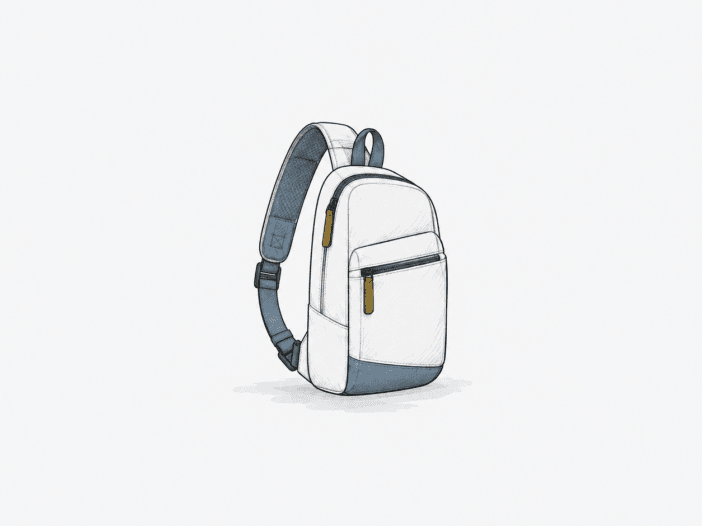
The tomtoc Navigator-T24 is built for loads where every item has a defined place. The compact 5L and 7L formats support device-first everyday carry. Still, available margin drops off as you approach the upper limits of laptop size, tablet thickness, bottle diameter, or spare clothing volume.
This is not a small bag that expands to hold every possible load; it is a carry system defined by fit boundaries. Older compatibility information uses previous size labels, so near-limit fit claims do not automatically apply to the current 5L or 7L versions.
The Navigator-T24 works best when compactness matters more than spare margin.
Best for: a tightly defined daily tech load built around an 11-inch-class tablet or, in the larger configuration, a 13–14-inch laptop, plus chargers and small essentials.
| Decision check | What matters |
|---|---|
| 5L vs 7L configuration | The 5L is better suited to tablet-first carry, while the current 7L adds a dedicated laptop compartment. Historical 7L/9L naming should not be transferred directly to the current sizing. |
| Device fit | The current 7L is intended for laptops up to 14 inches; 15-inch-class devices should be treated as a fit check. Tablets above 11 inches become more sensitive to case thickness and compartment choice. |
| Usable capacity | Bottles, rigid devices, and clothing compete for the same shared volume. Items that fit individually can still leave little spare room or make closure overly tight when carried together. |
| Strap stability | The padding can remain comfortable with compact loads, but the strap adjuster can slip under some conditions. Verify that your preferred ride height stays fixed with your actual load. |
| Weather boundary | Water resistance is suitable for splashes and short rain exposure, but sustained heavy rain sits outside the validated protection boundary. |
Main deal-breaker: Devices near the physical limits and fuller mixed loads can reduce normal clearance, cause tight closure, displace capacity, or require repeated strap adjustment.
If you need relaxed clearance for a 15-inch laptop, a bulky 12.9-inch tablet case, or space for both tech and clothing without precise packing, the Navigator-T24 does not provide that margin.

The current 7L lacks comfortable clearance for a 15-inch laptop.
The current 7L laptop pocket measures 12.31 × 9.65 × 1.18 inches and is declared for laptops up to 14 inches. That makes the intended decision boundary a chassis-clearance question, not a screen-diagonal promise.
In the previous configuration, a 15-inch MacBook Air without a case occupied all available space and placed tension on the top and zipper. This used the entire practical clearance, leaving no margin for daily carry. If your laptop is near this size, use the 7L as a measurement check, not as a guaranteed 15-inch fit.
When a laptop fills the available space, protection becomes a separate constraint. The top corners have less material above them in a top-first impact. The current 7L’s CornerArmor and high-density padding provide the intended protection only when the device remains within the designed clearance, not when the bag is used for the last millimeter of fit.
| Fit condition | What it means |
| 13–14-inch declared class | This is the intended current laptop range |
| Chassis near 15 inches | Clearance becomes a device-by-device verification |
| Case added near the limit | Available top and zipper margin reduces further |
- 13-inch M2 MacBook Air: fits cleanly inside the intended range.
- 14-inch Dell Latitude: fits cleanly at the upper end of the declared class.
Tablet fit is simple at 11 inches, but cases change the boundary near the limit.
Two checks underpin the tablet decision: the body must fit in the intended pocket, and the full carried setup must retain enough clearance once a case or keyboard is attached.
The 11-inch class stays on the clean side of the tablet boundary.
Both current configurations are specified for tablets up to 11 inches. An 11-inch-class tablet fits alongside a 14-inch Samsung Galaxy Book with room to spare, so that size is well within the practical device-first range.
Above 11 inches, fit depends on the specific configuration and compartment, not a general larger-tablet claim.
Added case thickness uses the same front-to-back clearance as the device.
Near the device limits, a protective or keyboard case uses the same depth as the device itself. A cased 14-inch-class laptop fits only if the chassis leaves enough margin, while a larger tablet setup may require a different compartment because of tight clearance.
In the 5L size, an iPad, keyboard, and bottle together use enough depth to stretch the front panel at closure. This is the physical case-fit boundary: once the carried setup fills the available depth, the bag deforms rather than providing extra space. The total carried setup, not just the bare device, sets the usable fit limit.
- 14-inch MacBook Pro with a protective case: works when the larger bag still has chassis clearance.
- iPad Pro 12 with keyboard: becomes a snug mixed-load setup.
- Galaxy Tab A9+ 11 with other compact gear: fits within a denser accessory load.

Shared volume is the real capacity limit, not the liter number by itself.
The internal bottle pocket, rigid devices, and clothing all use the same finite volume—a 27 oz. FJbottle Insulated Water (10.7 inches tall, 3.1 inches diameter) fits with a light sweater in the main compartment, but this combination leaves minimal space for additional items. This is the Navigator-T24’s core capacity trade-off: fitting one item can displace the space required for the rest of your daily carry.
A Hydro Flask Trail 24oz fits the internal bottle pocket and leaves room for small accessories. Front-to-back crowding is what shifts the 5L from compact to strained; when an iPad, keyboard, and bottle use that depth together, the bag stretches at closure instead of providing extra capacity.
| Bottle/load anchor | What happens to usable space |
| Hydro Flask Trail 24oz | Fits the internal bottle pocket with room left for small accessories |
| 27 oz. FJbottle Insulated Water + light sweater | Fits, but leaves little room for anything else |
| 25 oz Owala in the smaller 5L | Becomes extremely tight |
| 24 oz Owala | Fits at the upper edge of a compact bottle load |
The strap is comfortable when it stays set, but retention is not consistent.
The carry decision has two parts: whether the adjuster holds your chosen ride height and whether that ride height stays comfortable once the bag is loaded. They are separate checks because strap retention and load comfort describe different failure modes.
The adjuster can creep even when the sling itself carries securely.
Some configurations hold the selected strap position, while others let the strap loosen, or the bag shift as weight increases. A slippery strap or adjuster can lose the set length and require another pull to restore ride height.
If you carry the sling high and close to the body, repeated strap creep changes the bag’s position with each movement.
Thick padding helps, but load still sets the comfort ceiling.
The padded strap remains comfortable during extended walking and all-day use with a compact load. Denser loads or certain strap positions can still cause rubbing or feel heavy. The 5L and 7L formats provide the most benefit when you avoid filling every available pocket.
Durability has strong intact signals, plus one strap-stitching failure worth watching.
With a tight laptop keeping sustained tension on the top and zipper area, the seams, materials, and top-zip area remained intact after 4 months.
Zippers were issue-free after more than 1 year; the bag still looked new after 2 years; and at nearly 3 years of daily use, the bag remained in service. Those durations belong to different use histories and components, so they should not be read as one continuous wear timeline or as a predicted service life.
The counterpoint is specific: strap stitching began to fail at about 3 months, and the exact 5L or 7L configuration for that failure is not established. Because that seam is in the carry load path, visible separation there is a structural concern. Inspect the strap attachment directly; positive long-duration results do not guarantee every component on every unit.
Water resistance helps with routine rain, but it doesn’t guarantee waterproofing.
The fabric is water-resistant, and short rain exposure keeps contents dry. Light rain and splashes remain within the bag’s workable weather range.
Sustained heavy rain is outside the bag’s established weather limit. If your laptop or tablet will be exposed to prolonged rain, treat the Navigator-T24 as weather-resistant only and use a separate rain barrier instead of relying on the sling as a sealed enclosure.
What to check before buying
- Confirm the exact current 5L or 7L configuration before applying older 7L/9L compatibility material; compare the current listing dimensions and the physical side-strap position.
- Measure your laptop as carried, including its everyday case, against the current 7L pocket dimensions if the chassis is near the 14-inch limit or larger.
- Measure the complete tablet plus keyboard/protective case and confirm which current pocket it must use, especially above 11 inches.
- Lay out the full rigid-device, bottle, and clothing load and confirm the bag closes without front-panel stretch or unacceptable crowding.
- Load the sling and walk with it at your preferred ride height to make sure the strap adjuster does not creep.
Choose the Navigator-T24 when you want a compact, device-first load.
Choose it if:
- Your laptop is comfortably inside the 13–14-inch range, or your tablet is in the 11-inch class.
- Your normal load is deliberately compact: device, charger, power bank, small essentials, and a moderate bottle.
- You value a padded one-strap carry and can confirm the adjuster stays fixed under your normal load.
- Routine splash and short-rain protection is enough for how you commute.
Skip it if:
- You need relaxed clearance for a 15-inch-class laptop or expect to keep a near-limit laptop in a bulky case.
- A 12.9-inch tablet with a keyboard/protective case must have a guaranteed dedicated-pocket fit.
- You routinely combine a large bottle, clothing layer, and multiple rigid devices and still expect spare capacity.
- Strap-stitching risk or repeated strap adjustment would be a deal-breaker for carrying expensive electronics.
Check the tomtoc Navigator-T24 Sling on Amazon
Not sure whether this compact size is enough for your setup? Compare it with the other best tech sling bags for different carry needs.
