• Skip to primary navigation
  • Skip to main content

WellsifyU

Your Smart Shopping Starts Here

  • Backpacks
    • Small Laptop Backpacks (under 20L)
    • Medium Laptop Backpacks (20-29L)
    • Large Laptop Backpacks (30-45L)
    • Camera Backpacks
  • Messenger Bags
  • Briefcases
  • Tote Bags
  • Slings
  • Pouches
  • Sleeves

This post uses affiliate links. Products are selected based on repeated buyer feedback patterns and structured analysis. Disclaimer.

Home › Insights › Tech Pouches

Peak Design Tech Pouch: Small for Routine Tech, Regular for Bigger Loads

Updated: September 22, 2026

Peak Design Tech Pouch Small for Routine Tech, Regular for Bigger Loads

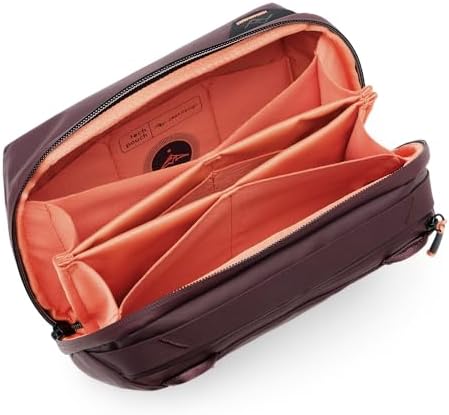
Peak Design built the Tech Pouch for structure, not for dumping loose gear. The Small handles daily or short-trip tech in compact bags. The Regular fits when your electronics load grows, but it needs more room in your main bag.

Both sizes organize gear well. Problems start when you pack bulky items side by side, fill every pocket, or prioritize squeezing space over staying organized.

Peak Design Tech Pouch
$59.95
Buy on Amazon

Product Snapshot

Size and load shape drive the decision here, not just how many items you carry.

Product detailDecision relevance
Size variants: Small and RegularSmall is better supported for routine tech and smaller host bags; Regular is better supported for broader electronics loads.
Structured divided interiorRepeated buyer reports say cables, chargers, SSDs, adapters, power banks, and small accessories are easier to separate and retrieve.
Partial clamshell / upright accessOften supports controlled desk or travel access without contents spilling; one buyer found the opening insufficiently wide.
Host-bag roleBuyers commonly use the pouch inside slings, backpacks, work bags, carry-ons, and suitcases.
Optional carry attachmentBuyer Q&A and reviews indicate a shoulder/sling strap is not included, despite attachment points being available.
Evidence limitsBuyer evidence does not establish verified official dimensions, weight, capacity, universal waterproofing, or a single authoritative material specification.

Buyer Evidence Metrics

Buyer reports split Small and Regular by how much gear you carry. Overpacking only causes problems in some setups, not every time.

Buyer QuestionMetricEvidence
Does the evidence consistently separate Small for compact loads from Regular for higher loads?UBC 1.00Moderate · n=10
Does strong organization sometimes appear with bulk or closure friction under heavy loading?TCR 0.22Moderate · n=18
Is host-bag footprint friction more concentrated in Regular evidence than in the Small baseline?CFL 3.00×Limited · n=4

UBC 1.00 means all 10 eligible size-comparison reports drew the same line: Small works for compact, daily loads, and Regular fits when you carry more gear. TCR 0.22 shows that bulk or closure trouble only showed up with organization strength in a few cases, so overpacking is sometimes a problem, not a built-in flaw. CFL 3.00× means footprint friction showed up more often with Regular than with Small, but that comes from Limited evidence, and some Regular users still report a clean fit in their main bag.

How these metrics work:

  • Use Boundary Consistency (UBC) tracks how often buyer reports draw a clear line between when a pouch works well and when it starts to feel limited or conditional.
  • Trade-Off Coupling Rate (TCR) shows how often a product strength and a specific friction show up together in buyer reports. TCR does not mean one causes the other.
  • Context Friction Lift (CFL) checks if a known friction shows up more often in a certain context than in the baseline group. CFL is not a measure of severity or odds. The public n for CFL comes from the smaller comparison group.
  • n means the count of relevant, eligible, deduplicated buyer reports used for each metric. It is not the total review count. Very Limited means n is 1 to 3, Limited is 4 to 7, Moderate is 8 to 19, and Strong is 20 or more. Numeric metric values are hidden when n is only 1 to 3.
  • These numbers reflect buyer evidence, not lab scores, rankings, or performance ratings.

Fit–Friction Matrix

Consider your gear’s shape and how much space your main bag has. Routine, spread-out tech fits well. Bulky items packed together or setups focused on squeezing every inch of space cause the most trouble.

Buyer Setup / ContextFit SignalMain Friction
Small with routine charging gear, SSDs, cables, and small accessories inside a sling or backpack for daily work or short tripsRecurring Strong FitExpanded or bulkier loads can push the buyer toward Regular; one packing-efficiency-focused buyer still found Small too stiff or space-hungry.
Regular with a broader computer or travel-electronics set inside a roomy work bag or backpackGenerally WorksLarger host-bag footprint; Regular-specific evidence is limited, and filling every pocket can prevent clean closure.
Chargers, cables, SSDs, adapters, and power banks distributed across the internal dividersRecurring Strong FitConcentrating bulky items in the same area or filling every partition can cause bulging or closure resistance.
Upright or partially opened desk / airplane useGenerally WorksThe controlled opening reduces spill risk for some buyers, but one buyer found it did not open wide enough for convenient access.
Packing-efficiency-first one-bag or minimal-load useMixed / Variant-DependentStructure, stiffness, weight, or footprint can feel excessive when the load is small, while other buyers still describe the pouch as compact or lightweight.

Variant Fit Patterns

Small fits best when your tech kit is routine, and your main bag is already on the compact side.

Small has more direct buyer reports behind it. People use it for daily carry, short trips, holiday travel, and swapping the same tech kit between bags.

Most buyers pack Small with charging gear, cables, SSDs, small peripherals, and a few extras. Some use it inside a Peak Design Sling 10L or an Everyday Messenger Bag. One buyer picked Small over Regular for shorter trips.

The line shows up when your kit grows. Some buyers switch to Regular for more gear, and one found Small too cramped from the start. On the flip side, a one-bag traveler with just a few cables and blocks still found Small too stiff and not space-efficient. Smaller does not always mean more minimalist.

Peak Design Tech Pouch - Small
Peak Design Tech Pouch – Small
$49.95
Buy on Amazon

Regular fits better when you care more about carrying extra electronics than keeping the pouch small.

Fewer direct buyer reports exist for Regular, so the evidence is thinner. Regular works for bigger work and travel loads with cables, adapters, chargers, batteries, memory cards, SSDs or HDDs, trackpads, and hubs.

Space is the main trade-off with Regular. One buyer found it too big and switched to Small. Another said filling every pocket made it hard to zip. Some Regular users still fit it cleanly inside a leather work knapsack or WANDRD PRVKE. The bigger size is a host-bag fit question, not a universal problem.

High-capacity reviews that do not identify the pouch size are not used to prove the capacity of either Small or Regular.

Peak Design Tech Pouch - Regular
Peak Design Tech Pouch – Regular
$59.95
Buy on Amazon

What Buyers Carry With It

What buyers actually pack shows that shape and how you spread out your gear matter more than just counting accessories.

ScopeObserved loadDecision relevance
SmallUSB cords, accessories, and power bricks inside a Peak Design Sling 10LShows Small’s strongest role: routine tech inside a smaller host bag.
SmallCharging cables, spare batteries, and a camera blowerSupports daily and short-trip use without implying a universal maximum load.
RegularSSDs/HDDs, trackpads, and hubs for travelIllustrates the broader electronics role supported by Regular-specific evidence.
Size not identifiedThree MacBook Pro bricks, four to five USB-C cables, and an Ethernet cable, with room reportedly remainingDemonstrates that a high-load setup is possible within the family, but the unlabeled size prevents using it as Small- or Regular-specific proof.

What Buyers Should Check Before Buying

Choosing the right pouch gets easier if you check your own setup against six practical points.

  • Pick your size based on how much your load grows, not just the label. Routine charging gear and small bags point to Small. A bigger computer or travel kit points to Regular.
  • Look at where your bulky items land. Some buyers say that putting chargers or big accessories next to each other, or filling every pocket, can make the pouch bulge or keep it from closing, even if the total item count seems fine.
  • Check your main bag, not just the pouch. Regular takes up more space, and even Small can feel too stiff if you want ultralight or space-minimal one-bag packing.
  • Think about whether the partial clamshell opening matches how you use your gear. Some buyers like it for keeping items in place on a desk or plane. Others want a wider-opening pouch.
  • Do not expect a shoulder or sling strap in the box. Buyer Q&A and reviews say the strap is sold separately, even though the pouch has attachment points.
  • Price is part of the trade-off here. Buyers often praise the organization and build, but many still call the pouch expensive or question if it is worth it compared to other options.
Peak Design Tech Pouch
$59.95
Buy on Amazon

If you want to see how this structured organizer compares with more compact, higher-capacity, and backpack-first options, explore our Best Tech Pouches roundup.

FIND MORE

  • Bellroy Tech Kit: Structured Organization Until Bulky Gear Competes for Space
  • Best Tech Pouches for Chargers, Cables, and Small Electronics
  • Osprey Daylite Powerhouse: Compact Tech Organization With a Capacity Boundary
  • tomtoc Light-T12 Pouch: Compact Tech Kits Suit Small; Bulk Makes Size Selection Critical
  • Thule Subterra Powershuttle: Choose by Load Geometry, Not Item Count

Tags: Host-Bag Integration, Loaded-Bulk Trade-Off, Mobile Work, Structured Organization

About Ahmad

I’m Ahmad, the founder of Wellsifyu. I use repeated buyer feedback patterns and structured analysis to turn crowded product choices into clearer buying decisions. I also run Penpoin.com, where I’ve built a long-standing practice of turning complex information into useful analysis.

TRENDING

  • Best Laptop Briefcases for Different Work Carry Setups
  • Best Laptop Messenger Bags for Work, Commutes, and Daily Carry

LATEST

  • Sony LCS-BP3 DSLR System Backpack: Large Camera Capacity, With a Bulk Trade-Off
  • Best Laptop Briefcases for Different Work Carry Setups
  • Samsonite Classic Leather Slim Brief: Slim Work Carry With Clear Capacity Limits
  • Kenneth Cole REACTION Out of the Bag Manhattan: High-Capacity Work Carry With a Heavy-Load Trade-Off
  • Wenger Mainframe Briefcase: Organized Work Carry With a Shoulder-Attachment Durability Trade-Off

TOPICS

Air Travel Capacity Trade-Off Compact Carry Daily Commute Device-Fit Boundary Device Organization Flexible Capacity Host-Bag Integration Load-Carrying Support Loaded-Bulk Trade-Off Mobile Work Open Packing Flexibility Quick Access Structured Organization

Copyright © 2026 · About Us · Privacy Policy · Cookie Policy · Disclaimer · Terms of Use · Comment Policy · Contact Me
As an Amazon Associate I earn from qualifying purchases.