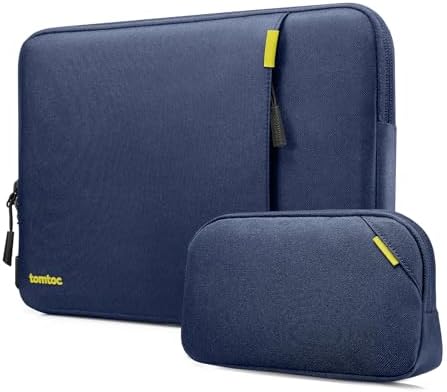
The tomtoc Defender-A13 is built for protection first. Reinforced corners and dense edge padding provide more cushioning than a thin slip case, and the separate pouch keeps rigid tech from contacting the laptop. This protective structure adds bulk, so the sleeve works best when impact protection takes priority over a compact pack size.
Fit depends on physical geometry, not the screen-size label. Chassis width, height, thickness, reinforced-corner clearance, and any installed hard shell all determine whether the zipper closes without force. The right sleeve size depends on the device’s actual configuration.
Choose it for padded carry only after you verify the geometry.
Best for: Buyers who want reinforced corner-and-edge cushioning plus a separate pouch for chargers and small tech, and who are willing to size from the laptop’s actual dimensions.
| Decision check | What matters |
| Device fit | Chassis width, height, and thickness matter more than screen-size labels; near-limit dimensions can turn a nominal size match into a snug or unsuitable fit. |
| Case-on clearance | A hard shell can consume corner and zipper clearance; size using the equipped laptop rather than the bare chassis. |
| Protection vs bulk | Reinforced corners and dense edge padding improve routine cushioning but materially increase the combined laptop-and-sleeve thickness inside a host bag. |
| Accessory organization | The separate pouch is better suited to rigid chargers and peripherals; the sleeve’s front pocket works better for flatter items. |
| Weather exposure | Light moisture is within the sleeve’s water-resistant boundary, but sustained or heavy rain requires an additional waterproof outer layer. |
Main deal-breaker: A nominal 13-, 14-, 15-, or 16-inch match doesn’t guarantee a practical fit; near-limit chassis dimensions or an installed hard shell can eat up the remaining closure clearance.
If you need an ultra-thin sleeve, guaranteed fit with a hard shell, or protection beyond the structural limits of a padded sleeve, set those requirements first. The Defender-A13 is not designed to exceed those boundaries.
Chassis dimensions decide the fit before the screen label does
The Defender-A13 requires three-dimensional clearance: your laptop’s width, height, and thickness must fit inside the sleeve’s internal geometry, with space for reinforced corners and the zipper path. Sizing guidance sets a maximum dimensional difference of 0.3 inches. Two laptops with similar screen-size labels can fit differently because of these physical boundaries.
A Galaxybook Pro 16 fits snugly and requires slight pressure to seat into the reinforced corners. After repeated insertions, the corner interface loosens, but the laptop remains secure without excess movement. If your device is near the clearance limit, use chassis measurements instead of diagonal size to select the sleeve.
| Named setup | Fit state |
| 15-inch MacBook Air | Clean fit |
| Asus G14 | Snug without becoming too tight |
| MacBook Air m4 | Snug fit; limited spare clearance |
| Galaxybook Pro 16 | Snug; initially needs light corner pressure |
A hard shell can change the correct sleeve size.
A hard shell increases both width and thickness at the edges, reducing available corner and zipper clearance. A thin shell may fit within the boundary, but a thicker shell can prevent closure even if the bare laptop fits. Sizing up increases internal slack and restores closure. Always measure the laptop with the shell installed to determine the correct sleeve size.
- 14-inch MacBook Pro: a hardshell-equipped configuration fits inside the sleeve.
- A thicker protective shell can prevent the 14-inch sleeve from closing. Switching to the 16-inch sleeve restores closure but leaves about 1 inch of extra internal space.
More padding improves the protective envelope but takes up more space in the host bag.
Protective padding affects both impact resistance and the space the sleeve occupies once packed. The same material that cushions the laptop also adds bulk, so consider both protection and available host-bag clearance.
Reinforced edges concentrate the cushioning where impacts are most likely.
CornerArmor, resilient edges, and high-density soft padding concentrate the thickest protection at the laptop’s perimeter. This construction is designed for routine padded transport and reduces direct contact with hard edges. The Defender-A13 does not provide unlimited drop protection; if your requirement exceeds the structural limits of a padded sleeve, choose a different solution.
The same material increases the combined stack thickness.
Padding adds measurable bulk. With the sleeve on a MacBook, the total thickness is about double that of the laptop alone. The extra material can make the Defender-A13 a tight fit inside a padded laptop compartment. More cushioning is only practical if your host bag has enough space for the increased thickness.
- Native Union’s Stow Slim case is slimmer and closes with magnets; the Defender-A13 keeps the thicker, corner-protection-first construction.
The accessory pouch handles rigid tech better than the sleeve pocket does
The storage system is divided into three zones, each with a specific function. The accessory pouch fits thicker hardware, the front pocket is designed for flat items, and tablet fit requires a separate geometry check. Depth, length, and case thickness affect each zone differently, so do not treat the three as a single capacity measurement.
The separate pouch is the right place for chargers and peripherals.
Rigid accessories require more depth than the front pocket provides. The separate pouch accommodates a charger and small peripherals. A bulky charging brick reaches the front pocket’s limit and may fit only with a slimmer plug.
- Samsung T7 + MX Anywhere 3: fits USB-C cables, a charger, a controller, and a hub in the accessory pouch.
- MX Master 3S: fits with a charger and USB-C hub in the separate pouch.
The front pocket is a flat-item layer, not a second tech pouch.
Cables, dongles, and papers fit the front pocket because it’s shallower and shorter than the separate pouch. Long or bulky rigid items can reach the pocket’s length limit before the accessory pouch reaches its depth limit.
- Apple Magic Keyboard: the front pocket would need about another 1/2 inch of length for it to fit.
Tablet fit changes with both height and case thickness.
The outer pocket allows a clean fit, a tight fit, or no fit, depending on tablet dimensions. A 9.7-inch tablet fits, but a 10.5-inch tablet with a 9.8-inch height is tight and only closes after removing its protective case. Some iPad Air configurations do not fit. Use carried dimensions, not diagonal size, to determine compatibility.
Weather, zipper, and long-term signals all have clear limits.
Secondary boundaries like rain exposure, zipper behavior, and long-term durability do not override the main fit and protection limits. Still, they set additional constraints for exposed commuting, frequent closure cycles, or multi-year use. Each imposes a separate physical limit and should be considered on its own.
Light moisture stays within the boundary; heavy rain does not.
The fabric is spill-resistant and can keep a laptop dry during brief wet-weather exposure. The sleeve is water-resistant, not waterproof. Sustained heavy rain can soak through, so you’ll need a waterproof outer layer for prolonged exposure.
The padded edge helps separate the zipper from the laptop, but hardware feel varies.
The padded perimeter separates the zipper path from the device surface, reducing direct contact. Zipper hardware does not behave uniformly: some closures operate smoothly, others feel less smooth, and isolated tooth failures can occur without a predictable service interval.
- 14-inch Mac: the zipper stays far enough from the lid that contact is difficult.
The durability checkpoints are useful, but they don’t forecast lifespan.
At 3 months of daily use, the sleeve showed no structural failure. A 15-inch sleeve with a MacBook Air maintained fit and protection at 2 years; another unit remained functional beyond 2 years; and a 4-year unit retained a snug fit without loss of protection. These are separate durability checkpoints for individual units, not a continuous lifecycle or a guaranteed lifespan.
What to check before buying
- Measure the laptop: compare its width, height, and thickness with the exact current internal dimensions of the sleeve size you plan to buy.
- Measure it case-on: repeat the fit check with any hard shell installed; the equipped laptop must close without forcing the padded corners or zipper.
Choose the Defender-A13 when protection matters more than minimum thickness.
Choose it if:
- Your measured laptop geometry fits the selected sleeve size with enough clearance to close.
- You want reinforced corner-and-edge cushioning and accept the added packed thickness.
- A separate accessory pouch is useful for keeping rigid tech away from the laptop.
Skip it if:
- You would be choosing only from the screen-size label and cannot verify chassis or case-on dimensions.
- You need an ultra-thin sleeve for a tightly dimensioned host-bag compartment.
- You need the sleeve itself to serve as a waterproof barrier in sustained heavy rain.
- Your protection requirement exceeds what the padded construction provides.
Check the tomtoc Defender-A13 on Amazon
When a thinner sleeve matters more than maximum padding.
| If you need… | Look at… |
| A slimmer sleeve with magnetic closure instead of the Defender-A13’s bulkier, corner-protection-first construction | Native Union Stow Slim — shifts the design toward a thinner profile and magnetic closure, making it the better-directed alternative when reducing sleeve bulk is the priority. |
Want to see how the tomtoc compares with slimmer and more structured options? Compare it in our Best Laptop Sleeves roundup →
