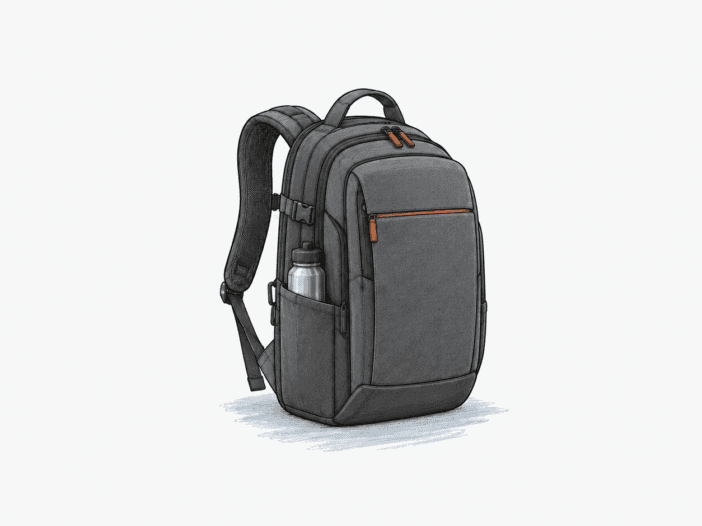
The Everki Atlas is built for mobile-office carry: laptops, tablets, chargers, documents, and small accessories each have a dedicated compartment rather than sharing a single space. The structure sets a physical boundary. The adjustable laptop bay, segmented interior, and harness all operate within fixed dimensions, so device size, bulky items, and a rigid laptop define what the bag can carry.
The Atlas works best when your laptop and load stay inside its structure.
Best for: tech-heavy commuting and business travel where organized separation matters more than low empty weight or one broad packing cavity.
| Decision check | What matters |
| Device fit | Screen size alone is not enough; large workstation/gaming chassis can exhaust padded corner and zipper clearance even within the nominal 17.3-inch class. |
| Packing efficiency | The segmented layout works best for laptops, chargers, documents, and accessories; bulky books or clothing can consume shared compartment depth and reduce usable space elsewhere. |
| Heavy-load carry | The 29.5 L and 32 L versions weigh 1.66 kg and 1.82 kg empty; the harness distributes dense loads well, but a large rigid laptop can still create persistent back-panel or shoulder pressure. |
| Long-term durability | The core bag can remain functional through years of commuting and travel, while stitching, bottle tethers, clips, or localized fabric damage can fail earlier. |
| Travel compatibility | Under-seat fit and laptop-in-bag screening are condition-dependent; packed bulk, seat hardware, airline limits, and checkpoint rules can change the result. |
Main deal-breaker: a 17- or 17.3-inch laptop can reach the padded corner and zipper clearance limit before the screen size label indicates a fit issue.
If your load is mostly bulky books or clothing, you need more uninterrupted packing depth. If you experience persistent shoulder or back-panel pressure, you need a different carry system.

Large-laptop fit depends on chassis clearance, not screen size.
The adjustable pocket secures different device sizes, but the bag itself has a fixed outer envelope. A Dell Precision 7770 (15 5/8 x 10 1/2 x 1 1/8 inches) reaches the top corners of the zipper area, not the padded zone. The sleeve adjusts grip but does not expand the bag’s external dimensions.
A 15-inch Dell Latitude fits with extra clearance at the lower end of the size range. As width, depth, and thickness approach the envelope limit, padded corner protection is reduced, and external pressure can reach the laptop. Once closure clearance is exceeded, the device cannot seat. If your laptop is near the maximum size, prioritize padded corner clearance and an unforced zipper over the diagonal screen measurement.
| Laptop | Fit inside the Atlas |
| 15-inch Dell Latitude | Fits with room to spare inside the protected range. |
| Lenovo Legion 16-inch | Fits at the protection limit; its corners can be felt through the bag. |
| Alienware 17R4 in Everki Atlas 17.3-inch | Does not fit; it protrudes about an inch from the top. |
Segmented storage rewards small-item organization, not bulky packing
The Atlas divides its interior into fixed zones, so a laptop, tablet, mouse, headset, chargers, drives, documents, and other small-to-medium work items each stay separated and accessible. All zones share the same physical depth. When a large rigid object fills one compartment, adjacent compartments lose usable space, even if the total liter capacity remains unchanged.
- Tech-heavy loads stay in range: Laptops, chargers, cables, documents, and accessories can occupy their dedicated zones without forcing everything into one cavity.
- Large books reduce available space in neighboring compartments. Oversized books only fit cleanly when isolated in the main book area.
- Adding overnight clothing to a standard tech load can exceed the available flexible depth, requiring a second bag.
The harness helps with weight until the laptop becomes part of the pressure path.
The five-point harness redistributes load through shoulder, lower, and sternum adjustments, with lumbar padding as an additional contact point. This system balances a dense workload, but adjustment only shifts the force location; it does not eliminate the rigid shape of a large laptop. The bag’s empty weight is 1.82 kg for the 32 L EKP121 and 1.66 kg for the 29.5 L EKP121S15 before adding your work kit.
With a 17.3-inch laptop loaded, limited padding can let the rigid device shape the back panel and concentrate pressure on the shoulders or back. If the bag stays balanced after adjustment, the harness is effective. If pressure persists in one area, further strap adjustment won’t fix the mismatch between the load and the back panel.
- Stay with the Atlas: when your real workload stays balanced after you set the shoulder, lower, and chest adjustments.
- Treat persistent pressure as a stop: if a rigid laptop still pushes through the back panel or shoulder interface after adjustment, choose a different carry system.
Long service is credible, but the first weakness may be a small component.
Long-term durability depends on which components take the most stress. The main shell can remain functional for years of commuting and travel, while stitching, tethers, or a local fabric flaw may degrade on its own.
Multi-year use can preserve the core bag while cosmetic wear accumulates.
After 6 months of daily work and about 40 flight segments, an Atlas still looked new. After more than 5 years of daily commuting, flights, overnights, and camping, an Atlas remained in fantastic shape.
After 8 years of near-daily work and travel—including drops, car-boot handling, under-seat use, dive boats, and brush contact—the bag showed cosmetic wear, but every zip, flap, and panel still worked. That long-running function does not guarantee how long a new Atlas will last.
Seams, tethers, and a growing tear can fail before the main shell.
After 6 months of repeated world travel, the fabric remained strong, but the stitching came undone in several places and needed a small glue repair. The side-pocket retention tether also tore out while carrying large bottles, leaving that retention point unable to support them.
A small fabric flaw can expand into a visible tear and require full bag replacement after 3 years of heavy use. For long-term reliability, inspect local seams, zipper stitching, tethers, and any growing flaw rather than relying on shell appearance alone.
Secondary interfaces can still change whether the Atlas fits your routine.
Once laptop geometry, packing style, and carry comfort are acceptable, the remaining questions are narrower. Bottle fit, tablet nesting, exposed storage, screening procedure, and under-seat clearance each depend on a separate interface.
Bottle fit depends on pocket geometry, not ounce capacity alone.
The side pocket is shallow and zippered, not a deep stretch sleeve. When a bottle’s geometry exceeds the pocket, the zipper or retention tether must support the bottle instead of the pocket holding it securely.
A 16-ounce Nalgene fits in the side pocket, but a 32-ounce Nalgene does not. A 1 L sports bottle can protrude but stays retained when the zipper is closed. For wide insulated bottles, diameter and shape determine fit more than stated capacity.
A full-size tablet can stay separate from the laptop.
A Surface Pro 3 with keyboard fits in the tablet area with another tablet and a legal pad, while the laptop stays in its own bay. For multi-device carry, this keeps tablets separate from the laptop sleeve and avoids stacking devices.
The open front slot is the wet-weather weak point.
The magazine slot lacks a flap, zipper, or sealed closure between the outside and the pocket interior. In steady rain, contents are exposed, and folding the opening shut does not prevent water entry during a downpour. Keep water-sensitive electronics in a closed compartment if rain is expected.
Lay-flat access does not control airport screening rules.
The laptop compartment affects how easily you can present your device, but it doesn’t determine whether security allows it to stay in the bag. At Phoenix, the opened compartment was accepted with devices inside, while UK and Norway airports required laptop removal, and Vancouver CATSA required both laptop and Kindle to be removed. Treat the lay-flat design as an access convenience, not a guarantee for laptop-in-bag screening.
Under-seat fit changes with packed bulk and seat hardware
The packed bag can fit under a seat, but the available space is determined by the aircraft, not the backpack. Increased packed bulk reduces clearance, and under-seat electrical equipment can shrink usable depth so that a normally packed Atlas may not fit. Previous under-seat fit does not guarantee future fit with the same packed shape.
What to check before buying
- Measure your laptop chassis. Compare width, depth, and thickness with the selected Atlas pocket, and ensure you have padded top-corner and zipper clearance.
- Test your exact bottle. Confirm its diameter and shape fit securely without forcing the zipper or relying on an overstressed tether.
- Check the departure checkpoint rule. Verify whether current security procedure allows the intended electronics-screening workflow.
- Check the current personal-item limit. Compare the selected Atlas dimensions and intended packed shape with the carrier and likely under-seat space.
Choose the Atlas when structured tech carry matters more than open volume.
Choose it if:
- Your laptop sits fully inside the selected pocket with padded corner clearance and an unforced zipper.
- Your load is mostly laptops, documents, chargers, and accessories that benefit from fixed separation.
- Your real loaded setup stays balanced after you adjust the harness.
Skip it if:
- Your laptop reaches the zipper line, protrudes, or leaves too little protection margin around the top corners.
- Bulky books, clothing, or rigid cargo need one broad, uninterrupted packing cavity.
- A large rigid laptop creates persistent shoulder or back-panel pressure after adjustment.
See the Everki Atlas on Amazon
Larger laptop envelopes are the next path when the Atlas stops closing cleanly.
| If you need… | Look at… |
| Room for an Asus G752- or MSI GT73-sized chassis | EVERKI Business 120 — moves the laptop boundary beyond the Atlas envelope. |
