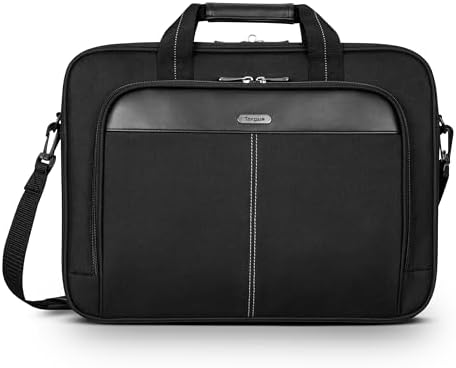
The Targus Classic Slim Briefcase is built for low-bulk office carry with a laptop as the primary load. Its 17 L capacity keeps accessories and light documents organized without adding unnecessary depth. Whether that simplicity works for you depends on three physical factors: shoulder-strap clip retention, your laptop chassis size, and the level of impact protection you need.
A practical slim briefcase—if the shoulder strap stays secure
Best for: light office or commute carry where a measured laptop fit, modest padding, and a slim profile matter more than maximum protection.
| Decision check | What matters |
| Shoulder carry | Fixed/non-swiveling clips can detach under twist and load; frequent shoulder carry depends on secure clip retention. |
| Device fit | Chassis dimensions and internal clearance matter more than screen diagonal; excess room reduces restraint, while oversized chassis can block zipper closure. |
| Protection boundary | Modest padding suits routine commuting, but device movement and weaker top/corner coverage limit protection against harder impacts. |
| Usable capacity | The 17 L slim format suits a laptop-first office load; bulky peripherals, books, or dense paperwork consume the shallow depth quickly. |
| Long-term durability | Main materials can remain functional for years, but bottom-corner wear appeared around 16 months under one daily laptop-and-paperwork load. |
Main deal-breaker: the supplied shoulder-strap clips can rotate into a release position and detach under load. If you rely on shoulder carry, the hardware must remain fully captured to avoid accidental drops.
If you need rigid impact protection, tight device restraint, or one-opening access to the whole kit, this is the wrong starting point.
The shoulder strap can turn a simple carry choice into a drop risk.
The strap issue is a geometric constraint, not a cosmetic one. A fixed, non-swiveling clip cannot follow every twist in the shoulder strap. When the webbing rotates the clip into its release orientation, the attachment can unseat, and the loaded briefcase can drop. Other strap positions remain secure, so the risk doesn’t occur with every use, but it’s significant enough to reconsider frequent shoulder carry.
If the supplied clips twist or detach under your normal load, switching to a replacement shoulder strap with swivel clips removes the fixed-rotation constraint. The replacement hooks must match the briefcase attachment points for secure connection.
Screen size is a poor fit guide; chassis clearance decides restraint and closure.
This compartment can miss the mark in two ways: too much clearance lets the laptop move inside the case, while too little clearance puts the chassis against the zipper path. A nominal ’15–16-inch’ label does not guarantee a proper fit; actual chassis dimensions set the physical limit.
Too much room can be as wrong as too little.
A 16-inch MacBook Pro in a 16 x 11.5 x 2.5-inch compartment leaves enough space for multiple laptops. The problem isn’t closure; it’s restraint. Excess clearance lets the device move instead of being held by the padded walls, so a bag can be physically large enough and still fail to secure the laptop.
At the other extreme, the zipper becomes the hard stop.
A Wacom Cintiq 16 fits with a snug margin, but a 17.3-inch laptop measuring 15.5 x 11 inches reaches the zipper boundary and cannot close inside the case. Once the chassis width uses up the available soft-side clearance, the opening cannot stretch to compensate. Actual width, height, thickness, and loaded clearance set the fit limit, not the screen diagonal.
| Laptop | How it sits in the compartment |
| 16-inch MacBook Pro | Fits with excessive spare room, leaving the device under-restrained. |
| Wacom Cintiq 16 | Fits snugly near the tighter end of the usable range. |
| 15-inch MacBook Pro | Fits with a charger, notebook, and light extras. |
| Lenovo T580 | Fits with a little wiggle room rather than excessive clearance. |
Padding helps with routine carry, but it’s not a substitute for rigid protection.
Padding stays modest to keep weight down, but protection depends on how tightly the laptop is restrained. A thin 15-inch laptop can move enough inside the padded area to build momentum before the padding stops it. The top and top-corner zones have less coverage, so the design handles routine bumps but does not provide reliable protection against concentrated hard impacts.
- Good match: the laptop sits with limited movement and everyday bump protection is enough.
- Compromise: a thin device shifts inside the compartment despite the surrounding padding.
- Outside its strength: rigid corner protection or dependable high-impact restraint is a requirement.
The 17 L body favors a laptop-first work kit.
The shallow 17 L format works best with flat, office-oriented contents: a laptop, charger, mouse, cables, notebook, and light documents. Thicker accessories and paper stacks quickly use up the available depth, so the bag doesn’t create extra usable volume for bulkier items.
- Comfortable load: laptop, power gear, mouse, cables, and a modest stack of documents.
- Starts to strain: multiple bulky peripherals, books, binders, or dense paperwork.
- Visible consequence: extra three-dimensional gear can make the soft case bulge instead of preserving its slim shape.
Organization is useful for basics, but access stays segmented.
Organization comes down to two factors: whether small gear has a dedicated place, and whether the main device area keeps items separated when you remove the laptop. The Classic Slim covers the first but not the second.
Small accessories have homes; papers and secondary gear can still collide.
The front workstation provides dedicated spaces for chargers, cables, pens, and phone-sized items. The rear document storage holds flat papers. The main device area lacks a strong divider so that loose papers can move into the laptop’s extraction path. Removing the laptop can wrinkle or pull documents along.
A Wacom Cintiq 16 fits, but its pen has no dedicated slot and can remain loose among other items. Specialized or multi-device kits may still need a separate folder or pouch to keep components separated, since the bag’s organization does not cover every accessory.
Top-load access keeps the bag slim, but it adds another unzip.
The laptop and accessory areas do not open as a single workspace. If you need one opening to access both the laptop and most accessories together, a clamshell laptop case provides that workflow. The Classic Slim’s separate access points do not combine into a single opening.
Long-term use can keep it functional, while the bottom corners remain the wear point to watch
After 1 year of carrying books, a water bottle, a notebook, files, a phone, and a charger, the nylon showed no ripping or tearing; the zippers functioned, the handles stayed sound, and the stitching remained intact. At 3 years of daily use, the briefcase remained structurally usable. At 5 years of heavy use, the briefcase still held up and maintained its appearance. These durations don’t define a new bag’s lifespan.
Bottom-corner wear can appear long before overall structural wear. With daily laptop and paperwork carry, without overstuffing or hard handling, the corner material began to wear at about 16 months. Repeated daily carry concentrates abrasion at the edges, so the corners require attention even when the rest of the bag remains functional. That timing is not a fixed wear schedule for every bag.
The trolley pass-through earns its space on business travel.
The rear pass-through keeps the briefcase secured to a suitcase. When the rolling-luggage handle fits through the opening, the strap captures the handle and stabilizes the briefcase against the suitcase, creating a unified moving stack. If the luggage handle is too wide for the pass-through, you lose this benefit.
Rain resistance stops at the zipper path.
The exterior tolerates incidental moisture, but the zipper path is not sealed. In rain, water can reach the outer storage and wet papers, while the inner laptop area can remain dry for a limited time. As rain intensity or duration increases, the gap between exterior wetting and interior protection becomes the limit. Sustained wet-weather carry requires a separate waterproof layer.
What to check before buying
- Stress the carry hardware under your normal load. Fill the bag, attach the strap, then lift and rotate it through the range of motion you actually use.
- Measure the laptop chassis, then close the bag with the intended load. Compare the width and height with the listed 15.25 x 10.50-inch compartment and confirm it moves acceptably.
- Feel the padding around the exact laptop. Pay particular attention to internal play plus coverage at the bottom, sides, top, and corners.
Choose it for a light office load; skip it when restraint matters more than slimness.
Choose it if:
- Your work kit is laptop-first, with power gear, a mouse, cables, and light documents rather than a deep stack of bulky items.
- Your measured laptop closes cleanly without excessive movement inside the compartment.
- The supplied shoulder clips stay in place under your normal loaded carry, and routine bump protection is enough.
- A trolley pass-through and simple office organization matter more than one-opening access.
Skip it if:
- The shoulder clips unseat or detach during normal movement while loaded.
- Your laptop is either too loose to stay controlled or too large for clean zipper closure.
- You need rigid corner protection, dependable high-impact restraint, or one-opening access to laptop and accessories.
- Sustained rain protection has to come from the bag itself.
Check the Targus Classic Slim Briefcase on Amazon
A 17.3-inch chassis needs a larger-fit case.
For a 17.3-inch laptop around 15.5 x 11 inches, move to a case built around the larger chassis.
| If your laptop… | Look at… |
| Reaches the Classic Slim’s zipper boundary at about 15.5 x 11 inches | Targus Neoprene Slipcase Sleeve — moves the carry target to a 17-inch-oriented case. |
Want to see how this slim setup compares to roomier, more compartmentalized options? Explore our Best Laptop Briefcases roundup.
