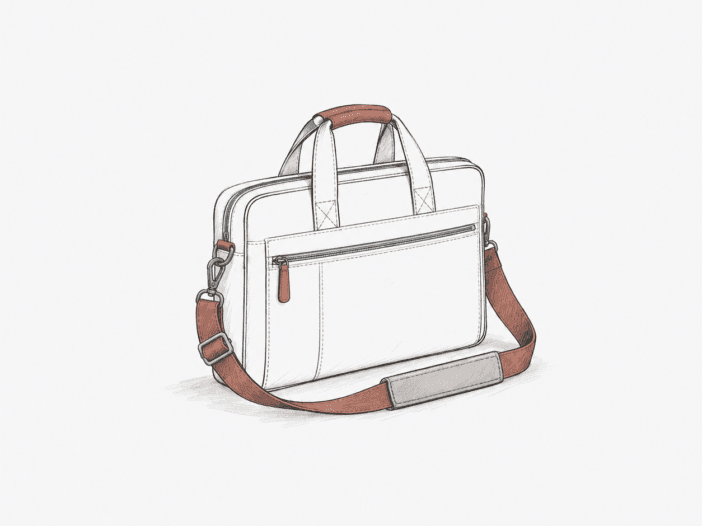
The Wenger Mainframe is a 19 L laptop briefcase designed for structured business carry, with separate storage for devices, documents, and accessories, plus a rear trolley pass-through.
The organization is straightforward, but the trade-off is a shoulder-strap attachment whose durability and configuration vary by unit. That means you need to weigh the benefit of compartmentalized storage against the strap-anchor design’s physical limits.
The Mainframe works best when organization matters more than shoulder-carry certainty.
Best for: Laptop-centered work and business travel where devices, documents, chargers, and small accessories benefit from dedicated storage instead of one open compartment.
| Decision check | What matters |
| Shoulder-carry reliability | Strap anchors can loosen, tear surrounding fabric, or break within months on some units; inspect both attachment points if shoulder carry will be frequent. |
| Strap configuration | Strap length, adjustability, removability, and attachment hardware vary by unit, so carry height and replacement options should not be assumed. |
| 19 L load boundary | Works well for a dense laptop-centered work kit, but bulky chargers and full packing consume usable margin and make the briefcase visibly larger. |
| Laptop fit | The padded compartment is 12.5 × 14.5 × 1.5 in; actual chassis dimensions matter more than screen diagonal, especially near the width and thickness limits. |
| Second-device fit | The tablet pocket is 10 × 7 in; tablets can fit separately from the laptop, but a protective case can materially reduce clearance. |
Main deal-breaker: The shoulder-strap attachment is a structural weak point. It can loosen, fray, tear the surrounding fabric, or break hardware, so repeated shoulder carry introduces more uncertainty than the rest of the layout.
If you need more catch-all capacity or require higher certainty in repeated shoulder carry, this 19 L briefcase falls outside those physical limits, and you should look elsewhere.
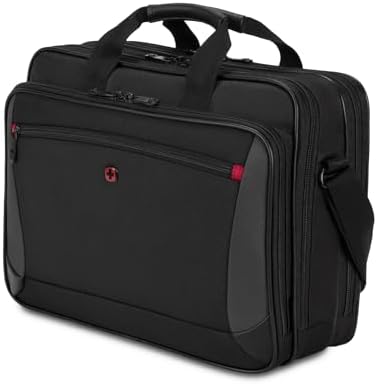
Shoulder carry is only as strong as the Mainframe’s side anchor.
Shoulder load transfers into the bag through a small attachment area, concentrating force at the seam and side fabric. If the interface begins to pull out, the failure can propagate: stitching loosens, binding unravels, fabric frays, and the side panel can tear. The attachment point, not the pocket layout, sets the structural limit for dependable shoulder carry.
Structural failure at the strap anchor can occur within 5 months of light office use, with side tearing, seam loosening after 6 months and 3–4 business trips, or binding separation in under 1 week even with handle carry. Because anchor construction varies, repeated shoulder carry cannot be assumed reliable across all Mainframe units.
Nineteen liters works for dense office tech, not unrestricted overflow.
The Mainframe makes its 19 L useful by dividing it among device, document, and organizer spaces instead of leaving the volume as one cavity. An LG Gram 16, cooling pad, and second monitor fit together while the accessory pockets keep the smaller gear separated. That fits well within the bag’s strongest role: a dense, laptop-centered work kit where organization matters as much as raw volume.
The compartment structure also sets the physical limit. A bulky charging block takes up a significant share of pocket volume, and a fully packed load pushes the soft shell outward, increasing the briefcase’s external size. When the load shifts from planned office tech to catch-all storage, the 19 L envelope no longer provides usable margin.
Laptop fit tightens around chassis geometry, not screen size.
The padded laptop compartment is listed at 12.5 x 14.5 x 1.5 inches, so outside chassis dimensions decide fit more reliably than the diagonal screen label. As laptop width or thickness approaches that physical envelope, insertion clearance shrinks; two machines in a similar screen class can therefore behave differently inside the same pocket.
An Acer Triton 700 fits, but with minimal clearance, placing it near the strain side of the compartment’s physical boundary. A 15 x 10.75 x 1-inch laptop also fits, while wider 16-inch-class laptops range from comfortable to snug. If your laptop approaches the compartment’s width or thickness limit, use the physical dimensions, not the screen size, as the fit benchmark.
- Dell Inspiron 15.6-inch laptop: Fits, marking the working side of the 15.6-inch chassis range.
- Acer Triton 700: Fits snugly, marking where clearance starts to tighten.
The second-device lane is useful until a tablet case consumes its clearance.
The dedicated tablet pocket creates a second device lane instead of forcing a tablet against the laptop. Its declared 10 x 7-inch envelope is the physical limit, so the relevant size is the tablet as carried; a protective case can consume clearance that a bare device leaves available.
With an MS Book 3 and its accessories in the laptop compartment, a Surface Pro 6 fits in the tablet slot, keeping both devices separated. An 11-inch iPad Pro also fits within the tablet pocket. The layout supports laptop-plus-tablet work, but as a tablet case approaches the pocket’s 10 x 7-inch limit, available clearance disappears.
Long service is possible, but there is no dependable minimum duration.
A Wenger Mainframe can remain structurally usable for close to 10 years, with handle wear as the primary visible degradation. More than 8 years of daily travel with a 15-inch laptop, large iPad, and extra gear can leave the briefcase in strong condition aside from cosmetic wear.
After over 4 months of daily use with a full load and several drops from a vehicle, the Mainframe can remain intact with strong zippers. Multi-year service is possible, but these durations often come with much earlier strap-anchor failures. Treat these as upper benchmarks, not as a guaranteed minimum service interval.
Shoulder straps can differ in both fit and removability.
The strap interface is not standardized across Mainframe units. Strap length determines where the briefcase rides, and attachment hardware controls whether the strap can be removed or replaced. Both depend on the exact configuration of the bag you receive.
Strap length controls carry height.
Strap length sets the physical distance between your shoulder and the bag. A shorter adjustment range raises the carry position and reduces fit flexibility. A 48-inch adjustable strap provides a longer range, while a shorter fixed strap can leave the briefcase riding higher than you might want.
Fixed hardware determines whether you can remove the strap.
Detachable hardware allows you to remove or replace the strap. Some Mainframe configurations use non-removable or non-rotating hardware, and some use plastic attachment pieces.
In a fixed configuration that cannot be unlaced from its loops, removing the strap requires cutting it off. These differences mean you need to verify the exact hardware, not assume it from the Mainframe name.
Protection is concentrated around the laptop, not evenly across the shell.
The dedicated laptop area uses foam to cushion the device, but not every outer surface provides the same protection. A thinner rear panel puts less material between contents and outside contact, and the base uses only small rubber pads instead of full feet. The practical protection comes from placing the laptop in its padded zone, not from treating the whole briefcase as a cushioned shell.
- Laptop zone: Dedicated padding provides the strongest device-specific cushioning in the bag.
- Rear panel: A thinner rear layer on one Mainframe reduces the material behind the contents.
- Base: Two small rubber pads add limited stand-off but don’t provide substantial impact isolation from the ground.
The trolley pass-through is the cleanest travel advantage.
The rear strap hooks around a telescoping luggage handle, shifting the Mainframe’s weight onto the rolling bag instead of your shoulder or hand. It works with rolling-suitcase and carry-on handles, so business travelers can carry less independently during airport transfers without changing how they pack the briefcase.
What to check before buying
- Inspect both shoulder-strap anchors. Look for fraying, loose stitching, separating binding, torn side fabric, or damaged attachment hardware on the exact bag.
- Match the exact unit to the current listing. Confirm the SKU plus strap length, detachability, clip rotation, pad adjustability, hardware, and material configuration you will actually receive.
- Measure the laptop chassis. Compare outside width, height, and thickness with the current padded-compartment dimensions rather than relying on screen size.
- Measure the tablet with its normal case. Compare the carried dimensions with the current tablet-pocket dimensions so the second-device lane stays usable.
Choose it for structured work carry only if you can live with the strap-anchor trade-off.
Choose it if:
- Your normal load is a laptop-centered office kit that benefits from structured separation of devices, documents, and accessories.
- Your laptop fits the padded-compartment geometry with enough clearance for comfortable insertion and removal.
- You accept that long service is possible without treating it as a guaranteed minimum service duration.
- The exact shoulder-strap anchors and carry hardware are acceptable for how often you intend to shoulder-carry.
Skip it if:
- Repeated shoulder carry must be dependable without accepting uncertainty at the Mainframe’s strap-to-bag interface.
- Your normal load needs catch-all room beyond the Mainframe’s 19 L office-tech role.
- You prefer backpack carry; a laptop backpack changes the carry format and shoulder-load distribution more directly.
- Extreme hard-work material strength matters more than business organization; a treated-canvas work bag better matches that priority.
See the Wenger Mainframe on Amazon
Need to compare this multi-device layout with slimmer or more expandable alternatives? See our Best Laptop Briefcases roundup for the key trade-offs.
