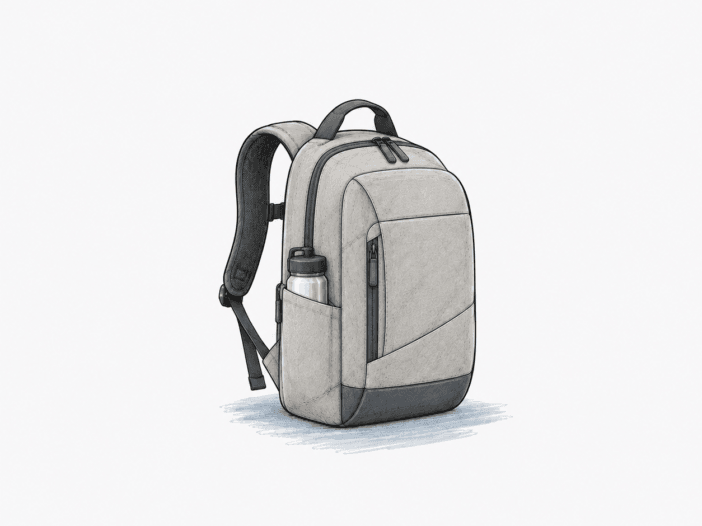
The Incase City Compact keeps a laptop and daily tech organized in a slim commuter backpack. Its padded compartments fit flat work supplies, but bulky packing, limited bottle access, and closure durability create sharper limits.

Built for
- Compact train and office commutes with a 13- to 15-inch laptop
- Flat notebooks, chargers and small daily electronics
- Soft-lined access for a phone or small tablet
- Travel days needing a slim personal carry companion
Not built for
- Bulky gym shoes plus a full laptop-and-book load
- Unverified thick 15.6-inch or 17-inch laptop fit
- Outdoor carry requiring waterproof protection
- External quick-access bottle storage
- Buyers needing clear zipper replacement and repair coverage
Where the Incase City Compact stops working
Consistent the same pattern holds within the covered conditions · Varies the outcome can change with setup, load, fit, or use · Occasional an exception appears alongside stronger working evidence
| Decision area | Stops working when | Still works |
|---|---|---|
| Usable packing depth Varies | Bulky shoes, clothing and thick books compete with the laptop and exhaust the slim cargo space. | A laptop, thin binders, notebooks, and small chargers remain organized across the main sections. |
| Shoulder retention Varies | Outward-angled straps slip or need readjustment on some shoulder shapes. | The padded straps carry a moderate laptop load securely when their angle matches the wearer. |
| Device clearance Varies | A thick 15.6-inch chassis or 17-inch laptop may miss the padded sleeve and require unprotected main space. | Several named 13-inch and 15-inch laptops fit the sleeve with modest accessories elsewhere. |
| Closure durability Varies | A pull tab, slider, or zipper track breaks or separates, leaving a pocket unable to close. | Intact closures support normal access, and an intact zipper keeps the compartment usable during regular access. |
| Bottle placement Varies | A large bottle crowds flat cargo or requires risky internal liquid storage. | A securely closed smaller bottle can share the main cavity with a limited school load. |
| Stitching and elastic Varies | A load-bearing strap seam or organizer elastic joint separates and impairs carry or storage. | Padded straps and organizer mesh remain usable while the stitching and elastic joints stay intact. |
| Wet-weather boundary Varies | Sustained heavy rain reaches the main compartment despite a protected laptop location. | A water-shedding shell handles incidental rain without immediately wetting the interior. |
| Compartment opening Varies | Small items become difficult to locate at the bottom of deep, partly opened pockets. | A compact opening keeps papers and small items from spilling during ordinary access. |
Main deal-breaker: The slim carry space does not stretch into a full gym or camera bag, and a failed compartment zipper can sideline an otherwise intact pack.
If your priority differs: The bag favors organized flat electronics over volume for thick objects.
How the Incase City Compact works
A flat everyday load packs efficiently; gym bulk uses up the shallow space
Flat school supplies · Bulky load trade-off
The Incase City Compact places laptop protection beside a slim shared cargo compartment. Thin binders and notebooks slide along the broad inner surfaces, leaving smaller spaces for a charger and writing kit. The organized layout works best when most items are relatively flat.
Shoes and rolled clothing change the geometry. Their thickness presses into the same main cavity used by folders and electronics, while the partial opening leaves less freedom to stack or retrieve a crowded load. A laptop with gym clothes and shoes can fill the bag, although lighter combinations of books and clothing remain possible.
A Dell XPS 13 with a power bank, mouse, headphones, and a light jacket fits a tech-oriented load. A Bose QC35 was a workable over-ear headphone option in a slim commute, but it doesn’t prove universal headphone clearance. The useful boundary is depth, not the number of small pockets: a workday load is easier to manage than a full work-and-gym load.
The padded straps spread daily weight, but their outward angle can slip
Padded contact · Fit varies
The City Compact uses adjustable straps with air-mesh padding to distribute a laptop load across both shoulders. The padding spreads local contact pressure, and the structured bag stays close to your back in typical commuter use.
The shoulder path still depends on strap geometry. When broad straps angle outward against a narrower shoulder line, their padded surfaces can drift toward the arm rather than staying in place. A comfortable fit on one frame therefore does not transfer to another, even at a similar pack weight.
With an appropriately matched harness, the pack remains comfortable on a walk; with the outward-slip pattern, the same movement requires repeated adjustment. Strap width alone is not comfort: stability depends on where the strap sits under the actual load.
The protected sleeve suits many 13–15-inch laptops, not every large chassis
Padded laptop sleeve · Chassis-dependent
The City Compact surrounds its designated laptop space with fleece lining and perimeter cushioning. The separated sleeve keeps the laptop away from loose stationery and charger edges in the main compartment. A 2015 15-inch MacBook Pro and a 2016 15-inch HP Envy x360 both enter the laptop space for the described device models, with the MacBook Pro fitting better.
Compartment clearance is more specific than screen diagonal. A 15-inch MacBook can fit snugly, while a 15.6-inch Lenovo P50 is specifically too large for the bag in a differently shaped-device arrangement. A 17-inch Lenovo was considered too large for the padded sleeve, with the general cavity suggested only as a possible alternative rather than a confirmed fit. Moving a machine out of the dedicated padded space also changes its protection. Thicker laptop housings can use up sleeve clearance before slim models with a similar diagonal.
The 13-inch MacBook Pro and Dell XPS 13 are named workable laptop setups, although case thickness and machine generation still matter. The deciding fit is the padded sleeve around your actual chassis, not a screen-size label or raw backpack length.
Small zipper components can end a bag’s service before its fabric wears out
Closure weak point · Mixed service life
The City Compact relies on zippers to keep laptop accessories and small items in separated compartments. When the tracks engage smoothly, the organizational layout gives quick access without exposing the entire load. The outer fabric may remain usable even if an individual pocket closure develops trouble.
The zipper path has little value when its small mechanical parts stop mating. A stiff pull or fabric flap can increase the force needed for access; a detached top-pocket pull removes the normal handle. Potential closure failures involve front-pocket zipper jams near 2 months, a laptop-compartment slider leaving the track near 8 months, track separation around 12 or 18 months, and a broken zipper near 36 months in distinct usage conditions.
A bag with a strong outer shell still depends on its closure hardware. A functioning shell cannot secure the contents of a compartment whose zipper has separated, and a repairable part can decide whether the entire bag stays useful. The zipper track is a more consequential durability checkpoint than the bag’s tidy exterior.
More details
A drink must share interior space with electronics
The City Compact keeps a streamlined exterior without the conventional side bottle pocket found on more utility-focused backpacks. A bottle therefore uses space in the main compartment also needed for a laptop, folders, and chargers.
A 25 oz bottle with a 13-inch laptop and binder can fit in some arrangements but feels tight in another. A taller or wider container displaces the remaining flat storage and remains alongside electronics rather than in a separate outside sleeve. Interior bottle carry is possible, but size and leak control become part of the packing decision.
Balanced daily carry can become uncomfortable on long heavy walks
The City Compact combines adjustable padded straps with a compact body, keeping a typical laptop load close to the wearer instead of hanging it from one shoulder. A workable configuration stays comfortable during walking or cycling.
When dense books add weight or the wide straps sit poorly, padding alone can’t fix the geometry. The same strap spacing can feel stable on one torso and awkward on another. Carry comfort follows the load and shoulder contact, not a blanket promise from the padding.
The shallow interior gives a DSLR little protected room
The City Compact uses a slim main cavity shaped mainly for laptops and flat equipment. Without defined padded camera dividers, a DSLR has to share space with paperwork and other electronics.
A DSLR might fit with extra protective padding, but a Nikon D7000 paired with a 13-inch MacBook Pro is unlikely to have comfortable room in the shallow shared space. The outcome depends on camera depth and the amount of adjacent cargo. A camera might fit, but entry alone doesn’t turn the compartment into a protected camera bay.
Soft-lined pockets help tablets, although pocket layouts vary
The City Compact gives scratch-sensitive devices soft contact surfaces away from loose pens and charger plugs. An iPad Mini occupies the upper lined pocket in one specific configuration, while an 11-inch iPad Pro fits the front padded compartment in another. A Nintendo Switch with case is also described in a front-pocket load alongside accessories.
Openings and pocket maps can differ by production version, and the same soft fleece doesn’t mean equal crush protection. A larger tablet may need the main compartment instead of a smaller quick-access space. Tablet compatibility depends on the exact internal divider and case thickness, not simply the presence of fleece.
The strap joint and inner mesh deserve closer attention than the shell
The City Compact carries its load through stitched shoulder-strap attachments and uses elastic-backed mesh to keep small items separate from the main load. Both interfaces are useful while the seams retain their grip.
Stress concentrates at a narrow join when you lift the pack, or when the organizer catches a folder edge. One shoulder seam popped after three months, a replacement organizer’s mesh separated from the elastic after two months, and another strap broke during walking within three months. A separate strap elastic band came undone after a similar interval. A strong-looking polyester panel does not rule out a weak stitched connection.
Water shedding helps in light rain, not in prolonged downpours
The City Compact fabric can shed some rain while the internal laptop space adds another layer between a device and the outer shell. The separation helps in lighter exposure, but the bag is not a sealed dry container.
During sustained heavy rain, moisture can reach the main cavity while the rear laptop pocket may remain dry. Fabric water resistance does not seal zipper openings or seams against repeated wetting. Light rain and sustained rain belong to different operating ranges; the inner pocket cannot keep every downpour out.
Dark fabric conceals everyday marks better than pale dust
The City Compact’s darker textile surface can keep a neat commuter appearance through ordinary handling. Pollen and light dust remain visible when their pale color contrasts with the shell, but you can wipe away loose surface deposits.
Fabric texture and finish vary across colorways and generations, and a surface-cleaning example cannot block every stain. Routine wipe care is reasonable; complete resistance to dirt or rain is not.
Restrained zipper openings trade quick containment for harder access
The City Compact does not open into a broad clamshell. Its partial zipper paths hold the long, narrow compartment together while the bag is upright, reducing the chance of a loosely packed load tumbling out.
The trade-off appears when you need to reach the bottom. A black interior reduces visual contrast, and the front divided pocket opens less widely than its depth suggests. The zipper runs along only part of the compartment sides, leaving a noticeably smaller opening; a 30% comparison illustrates the restrictive mouth rather than a measured dimension. The narrow mouth organizes flat cargo but slows retrieval of a small object buried below it.
Dedicated slots organize small gear until exposed mesh snags
The City Compact separates small accessories into a divided front panel and mesh section in the main compartment. Pens, loose cables, and chargers stay easier to reach when each occupies a slot rather than dropping into the shared cargo space.
The mesh pocket faces nearby stationery, and a notebook edge can catch its open fabric as cargo shifts. A flat, staple-bound notebook slides past more readily than an exposed spiral, while a worn elastic join can separate from the mesh. The pockets work best with smooth, compact accessories; bulky or snagging paper loads reduce their advantage.
Structured professional styling keeps the pack unobtrusive
The City Compact holds a neat urban outline rather than collapsing into a loose sack. The comparatively narrow body protrudes less during crowded transit and fits alongside office clothing without an overt outdoor-pack appearance.
The same structured walls won’t stretch around a large gym kit or add extra side pockets for bottles. A rigid-looking body can preserve its appearance while offering little room for bulky items. Its compact form works best as a deliberate tech-carry choice, not a disguised large travel pack.
Fleece reduces abrasion while foam padding has impact limits
The City Compact lines the laptop section with fleece and surrounds it with padding, giving device edges a softer contact surface than an unlined cargo compartment. The cushioning reduces contact with pens and other hard accessories while the computer stays in its own sleeve.
Foam compresses under an abrupt impact. A hard set-down can damage a laptop display corner even with padded sides, since foam compresses rather than isolating every impact. Bottom padding may be thinner than the side cushion. The padded compartment helps with scrapes and minor bumps; it doesn’t make a hard drop harmless.
Repair access matters when a zipper or seam is the failure point
The City Compact can remain useful in its outer shell even after a relatively small zipper or stitched joint fails. The practical service outcome then depends on repair access rather than storage capacity or surface condition.
Repair support may take the form of a one-time courtesy replacement, a discounted replacement coupon, or a declined warranty claim. Outcomes depend on the claim and seller context, and terms may differ. A useful commuter bag loses practical value if a broken closure cannot be repaired economically.
What remains to confirm before choosing
- Device clearance: Check exact laptop length, width, and thickness against the sold sleeve opening, with any case in place.
- Tablet organization: Inspect the actual pocket division and insert the tablet with its case.
- Serviceability: Read current Incase and retailer terms for zippers, shoulder seams, and repair service.
See the Incase City Compact on Amazon
When the core fit breaks, change the carry geometry
| If you need… | Look at… |
| A different carry fit because the City Compact’s straps sit wide or slip outward | Incase Icon Slim — the replacement choice when carry comfort becomes the deal-breaker |
